Defining Extension
Use the Extension page to define the extension application class that will be used by the object owner to provide custom PeopleCode validate, transforms, and merge data set instances.
Navigation:
This example illustrates the fields and controls on the Data Set Designer – Extension page. You can find definitions for the fields and controls later on this page.
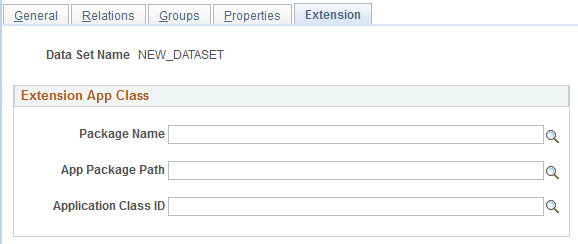
The applicant class the user specifies on this page will extend the PTADSDEFN:AdsValidationBase application class that is part of the data set framework. Specific methods of the AdsValidationBase application class or its extension class are invoked at a particular time during processing.
There are four areas of functionality controlled by in the AdsValidationBase application class that are designed to be implemented by object owners:
-
DB Integrity Checks
-
To File Custom Transforms
-
From File Custom Transforms
-
From File Custom Merging
Application Class Extension
Developers can extend the PTADSDEFN:AdsValidationBase base class to define specific validation logic. AdsValidationBase provides an empty implementation of the methods of the Application Class that a data set definition may be associated with. To provide validation or transformation logic in PeopleCode, a developer will override the appropriate base class methods and provide additional methods and properties as necessary.
Validation is implemented in the CustomValidate method. See CustomValidate.
Important:
Unless mentioned in this document as being designed for extension other methods in the AdsValidationBase base class are used internally so changing or overriding them will modify basic behavior.
DB Integrity Checks
The Database Integrity Check should be run on the target database after the copy from file to ensure database integrity.
DB Integrity Checks use the DoADSValidations method provided in the AdsValidationBase base class. This method will validate for static prompts, translates, Y/N values, and required fields. If a validation error is detected, information about the error is written to a target database table and DoADSValidations returns false to the C++ layer. Thus even if no application class has been associated with the ADS definition, this method will perform the default validations.
To File Custom Transforms
To File Custom Transforms are used by the owners of a few objects to implement custom transform instances from a newer PeopleTools release to an older release, such as from 8.54 to 8.53. This transform is applied at copy to file time and on the newer release. The ADS and record definitions of both the newer and older release must be present.
The transform is implemented in the DoTransform method. See DoTransform.
From File Custom Transforms
From File Custom Transforms might be used by the owners of a few objects in a few circumstances such as:
-
To implement custom transform instances from a older PeopleTools release to an newer release, such as from 8.53 to 8.54.
-
To provide value transforms when data in the object needs to be adjusted in some way.
-
To perform custom merging outside of merge groups.
This transform is applied prior to compare, validate or copy from file time on the newer release. The ADS and record definitions of both the newer and older release must be present.
The transform is implemented in the CustomTransform method. See CustomTransform
From File Custom Merging
This is for adjusting the automated merging performed when merge groups are present. Attribute values that are in a merge group are, by default, merged to the source from the target. However, there may be additional adjustments that need to be made to the object to assure the object has consistent data. In some cases other objects in the same FAMILY may also be adjusted at this time.
The transform is implemented in the CustomMerge method. See CustomMerge