Working With PrintProject Reports
PrintProject produces an HTML report in RTF (rich text) format. The report is written directly to the report directory. The report will be named <PROJECT_NAME>-PrtPrj.html for example if the project name is EXAMPLE, the report name is EXAMPLE-PrtPrj.html. In Application Designer there will be a link to the report in the output window.
This example illustrates the fields and controls on the PrintProject report. You can find definitions for the fields and controls later on this page.
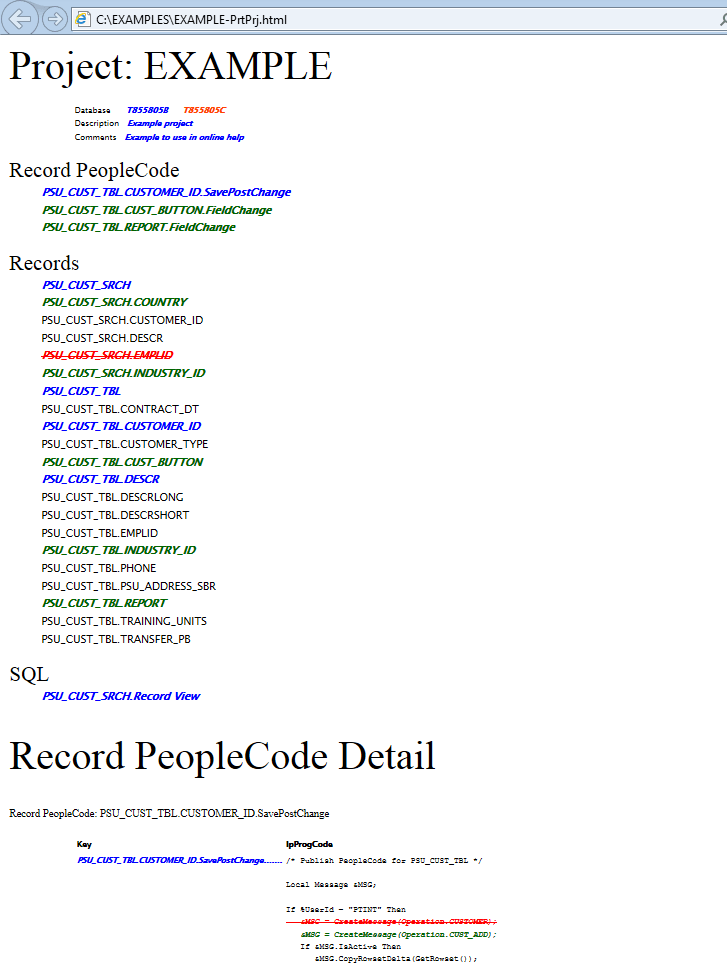
The first section of the report contains some general information including the project name, project description, and comments.
The second section of the report contains an index of all the objects included in the project. The objects in this section that appear in red with a strikethrough are objects marked for deletion.
A details section is displayed for each object type in the projects, this section displays added, deleted or changed code and/or attributes.