Configuring the CTI Console
Access the CTI Configuration page using either of the following navigation paths, whichever is appropriate to you, to configure the CTI (JSMCAPI) console:
(if you are using the CTI server) or (if you are using a third-party routing server).
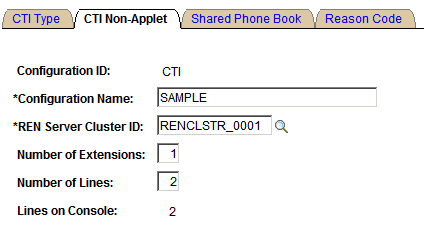
This example illustrates the fields and controls on the CTI Non-Applet page. You can find definitions for the fields and controls later on this page.
| Field or Control | Description |
|---|---|
|
Configuration ID |
Displays the name of the CTI configuration. The name cannot be modified after it is created. |
|
Configuration Name |
Add a descriptive name to help identify the configuration. |
|
Number of Extensions |
Enter the number of extensions or directory numbers associated with the telephone. |
|
Number of Lines |
Enter the number of lines associated with each extension. Depending on your configuration, you can enter up to two lines. |
|
Lines on Console |
The CTI Console supports up to two lines. The only supported configurations are two extensions with one line each, one extension with two lines, and one extension with one line. |