Configuring External Keystore in REN Server
Certificates that are used to secure a Web server can be reused to secure a REN server. The Java keystore that stores these certificates can be converted to a PKCS #12 keystore. Subsequently, you can configure the REN server to use the newly created external PKCS #12 keystore when you define a REN server the SSL and the UseExternalKeystore options are selected.
To convert a Java keystore to a PKCS #12 keystore, you can use the PSExportToPKCS12.bat file that is delivered by Oracle.
-
Access the piabin directory in your web server installation and locate the PSExportToPKCS12.bat file.
Note:
Ensure that the JAVA_HOME environment variable is set correctly.
-
Run the PSExportToPKCS12.bat in Windows or PSExportToPKCS12.sh in UNIX.
Note:
The PSExportToPKCS12.bat and PSExportToPKCS12.sh scripts must be run using a version of the Sun Java Runtime environment compatible with your PeopleTools installation.
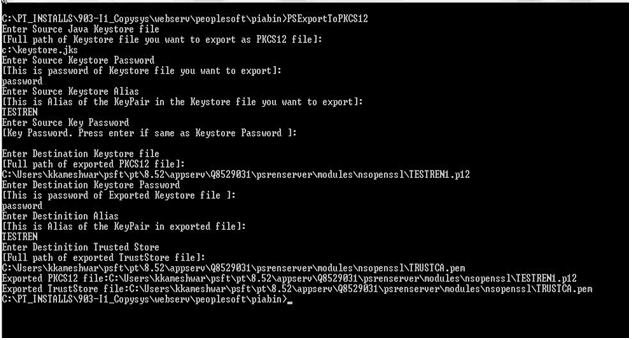
This example illustrates the conversion of Java keystore to PKCS #12 keystore using the PSExportToPKCS12.bat file.
Note:
The PSExportToPKCS12.bat file must be run prior to defining a REN server in the REN Server Configuration page. The file must not be run during the boot sequence of the application server.
-
Enter values for the following:
-
Source Java Keystore — the full path of Java Keystore.
-
Source Keystore Password — the password of the Java Keystore
-
Source Keystore Alias — alias of the KeyPair in the Java Keystore.
-
Source Key Password — if the password is the same as Source Keystore Password, you can leave it blank.
-
Destination Keystore — the full path of exported PKCS #12 keystore including the file extension (.p12 is preferred).
-
Destination Keystore Password — the password of exported keystore.
-
Destination Alias — alias of the KeyPair in exported keystore.
-
Destination Trusted Store — the full path of the exported TrustStore file including the file extension (.pem is preferred).
The Java Keystore is converted to PKCS #12 keystore.
-