Viewing Information About the Agent Information Page
Access the Agent Information page using the following navigation path:
This example illustrates the fields and controls on the Agent Information page. You can find definitions for the fields and controls later on this page.
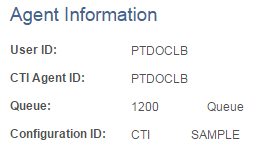
The Agent Information page is a read-only page that displays the following information about a CTI agent.
| Field or Control | Description |
|---|---|
|
User ID |
Displays the agent's PeopleSoft user ID. |
|
Agent ID |
Displays the agent's CTI middleware ID. |
|
Queue |
Displays the queue to which an agent is assigned. |
|
Configuration ID |
Displays the configuration ID associated with the agent. |