Defining an Analytic Type
In PeopleSoft Application Designer, select . A new analytic type definition appears, containing tabs for transactions, records, and models. The definition combines these items with an OPI to form the basis of an optimization application.
This is an example of the analytic type definition:
This example illustrates the fields and controls on the Analytic Type – Transactions tab.
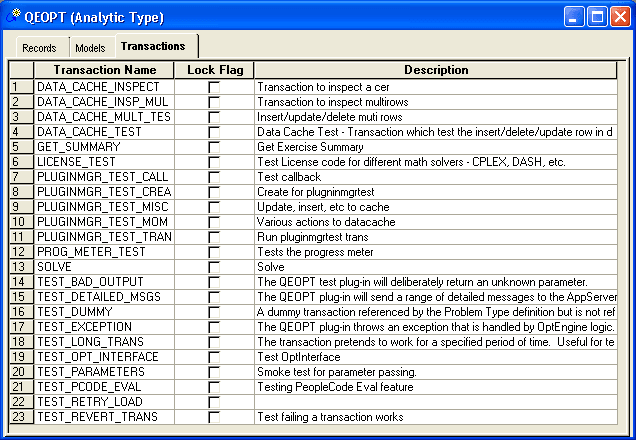
To complete the analytic type definition, you should configure the analytic type properties, then insert and configure the records, the optimization models, and the transactions, in that order.
To access the Analytic Type Properties – Attributes dialog:
-
From the Analytic Type – Transaction tab, select .
-
Select the Attributes tab.
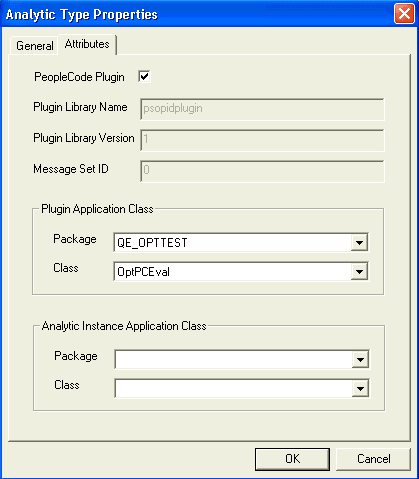
This example illustrates the fields and controls on the Analytic Type Properties – Attributes tab. You can find definitions for the fields and controls later on this page.
| Field or Control | Description |
|---|---|
|
PeopleCode Plugin |
Select to indicate that the analytic type should use the Optimization PeopleCode plug-in. Select this check box only if the analytic type is to be used with optimization. If the analytic type is to be used with the analytic calculation engine, do not select this check box. Psopidplugin is automatically entered in thePlugin Library Name field, which is read-only. If you use this plug-in, you must also use the Package andClass fields to specify an application class that was developed to adapt the Optimization PeopleCode plug-in to your optimization application. |
|
Plugin Library Name |
Enter the name of the OPI library. Enter only the portion of the name that is specific to this library. Ignore operating system-specific prefixes (such as lib) and suffixes (such as .dll). In the exercise example, in Microsoft Windows, the library is libqeopt.dll. You would enter only qeopt here. If you selected the PeopleCode Plugin check box, this field contains the valuepsopidplugin, and is read-only. |
|
Plugin Library Version |
Enter the application release version of the plug-in. The optimization engine uses this to confirm that the correct version of the plug-in library is used at runtime. |
|
Message Set ID |
Enter the message set ID in the message catalog containing the messages for the optimization application. The OPI uses this to access messages from the message catalog. |
|
Plugin Application Class – Package |
If you selected the PeopleCode Plugin check box, you must specify here the application package containing the application class to use with the Optimization PeopleCode plug-in for your optimization application. |
|
Plugin Application Class – Class |
If you selected the PeopleCode Plugin check box, you must specify here the application class containing the optimization PeopleCode program to use with the Optimization PeopleCode plug-in for your optimization application. This class must be a subclass of the PT_OPT_BASE:OptBase application class. |
|
Analytic Instance Application Class – Package |
If this analytic type is to be used with the PeopleSoft Analytic Calculation Engine, specify the application package name to associate with this analytic type, that contains the functionality to be used with the analytic type when it is created, deleted, or copied. See Analytic Calculation Engine: Creating, Deleting, and Copying Analytic Instances. |
|
Analytic Instance Application Class – Class |
If this analytic type is to be used with the PeopleSoft Analytic Calculation Engine, specify the name of the class in the application package that contains the Create, Copy, and Delete classes. |
Related Topics