DeleteItem method: Data collection
Syntax
DeleteItem(number)Description
The DeleteItem method deletes the item (row of data) at the position specified by number. This parameter takes a number value.
When the DeleteItem method is executed, if there are any RowDelete PeopleCode programs associated with any of the fields, they fire as well, as if the user pressed ALT+8 and ENTER or clicked the DeleteRow icon. However, the programs are executed as if turbo mode was selected. (In turbo mode default processing is performed only for the row being deleted.)
If you set the InteractiveMode property to True, any RowDelete PeopleCode runs immediately after you execute DeleteItem. If this property is set to False, any RowDelete PeopleCode runs after you execute the Save method.
The deleted item is not actually deleted from the database until after you use the Save method.
Example
Here is an example of EMPL_CHK_BC in Component Interface Tester where in , suppose your Component Interface had two scrolls: EMPL_CHECKLIST and EMPL_CHKLST_ITM. The data collection EMPL_CHECKLIST has four items (rows of data.) The data collection EMPL_CHKLST_ITM (under the third item) has five items (rows of data.) If you run this component in the Component Interface Tester, it would look as follows:
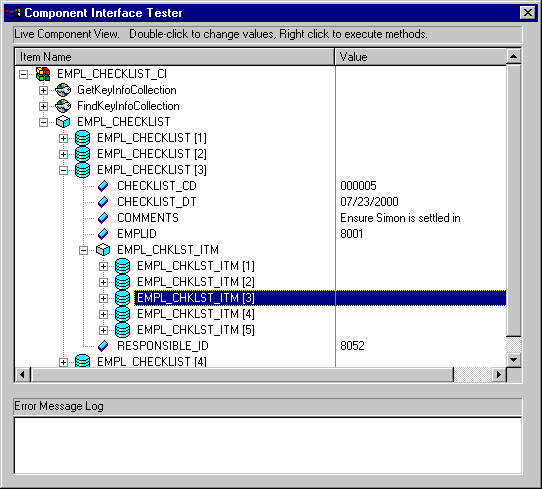
To delete the third row in the third item, use the following:
Local ApiObject &MYSESSION;
Local ApiObject &MYCI;

&MYSESSION = %Session;
&MYCI = &MYSESSION.GetCompIntfc(COMPINTFC.EMPL_CHK_BC);
&MYLVL1 = &MYCI.EMPL_CHECKLIST;
&ITEM2 = &MYLVL1.Item(3);
&MYLVL2 = &ITEM2.EMPL_CHKLST_ITM;
&MYLVL2.DeleteItem(3);
&MYCI.Save();