DisplayFormat property: Field class
Description
The following image is an example of PHONE-INTL format. Use this property to specify a custom format to use for the field. This property is read/write. The custom format for a field is specified in the field definition. This property enables you to switch between display formats that are defined as part of a custom format. For example, suppose your field used the PHONE-INTL custom format:
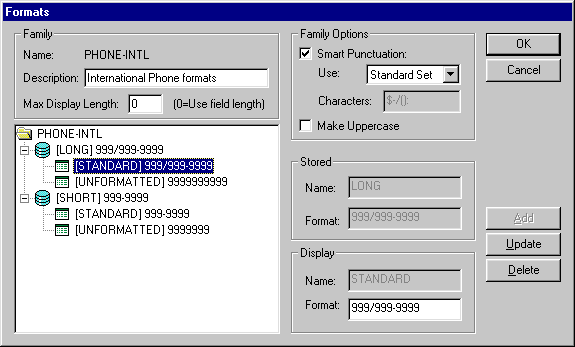
Both the LONG and the SHORT stored formats have two display formats: STANDARD and UNFORMATTED.
Using this property, you could select either of the display formats. For example:
If %Component = PAGE.INTERNATIONAL
   &CHAR.DisplayFormat = "STANDARD";
Else
   &CHAR.DisplayFormat = "UNFORMATTED";
End-If;
Note:
You cannot change the Stored format, but you can find its value using the StoredFormat property.
Example
&CHARACTER.DisplayFormat = "STANDARD";/* this assumes that &CHARACTER is a custom formatted field,
and a display format option is STANDARD */Related Topics