Example of Tile Content
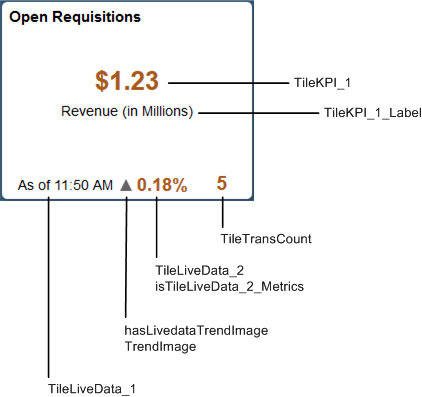
The following example illustrates how tile content, live data, and badge data will appear together on a tile, and which properties were used to set which data values and formatting options. In Tile Wizard, the following options were set for this tile definition:
-
Title: Open Requisitions
-
Tile content: Data-1-KPI
-
Live data: Enabled
-
Badge data: Enabled
The following diagram
illustrates example tile content:
- TileKPI_1 value: $1.23
- TileKPI_1_Label value: Revenue (in Millions)
- TileLiveData_1 value: As of 11:50 AM
- TrendImage value: ▲
- TileLiveData_2 value: 0.18%
- TileTransCount value: 5
The following PeopleCode excerpt provides an example of how specific data values and formatting options were set for this tile:
/* 1 KPI tile content */
%This.TileKPI_1 = %This.getAmountFormattedValue(1.23456789, "USD");
%This.TileKPI_1_Label = "Revenue (in Millions)";

/* Live data */
%This.TileLiveData_1 = "As of " | DateTimeToLocalizedString(%Datetime, "h:mm a");

%This.hasLivedataTrendImage = True;
%This.TrendImage = %This.k_strTrendUpImage;

%This.TileLiveData_2 = "0.18%";
%This.isTileLiveData_2_Metrics = True;

/* Tile badge */
%This.TileTransCount = &req_cnt;