GetDoc method: Business Interlink class
Syntax
GetDoc(docname)Description
The GetDoc method gets a document from an output structure. The document is an output parameter for a Business Interlink object that is not of simple type (such as integer or string). You must get the document from the output structure before you can get values from its members with GetValue.
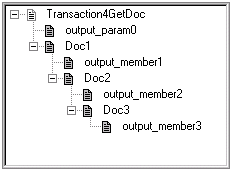
You can call GetDoc using dot notation, to access documents that are "nested" within other documents. For example, the following accesses a document nested three levels deep:
&Docs3 = &CalcCostOut.GetDoc("Doc1.Doc2.Doc3");Parameters
| Parameter | Description |
|---|---|
|
docname |
The name of the document that GetDoc should get from the output structure. |
Returns
A reference to the document received from the output structure.
Example
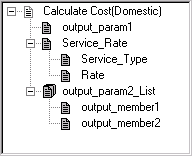
In the following example, the Output structure for Calculate Cost(Domestic), or the root level document, is created with the GetOutputDocs method. (To create, or get, more Output structures, call GetNextDoc.) The Calculate Cost output parameter Service_Rate is a document, so the GetDoc method gets it from the Output structure.
Local Interlink &QE_COST;
Local number &count;
Local BIDocs &CalcCostOut;
Local BIDocs &ServiceRateDoc;
Local number &ret;
&QE_COST = GetInterlink(Interlink.QE_COST_EX);
// Get inputs, execute. (code not shown)
&CalcCostOut = &QE_COST.GetOutputDocs("");
&ret = &CalcCostOut.GetValue("output_param1",&VALUE);
&ServiceRateDoc = &CalcCostOut.GetDoc("Service_Rate");
&ret = &ServiceRateDoc.GetValue("Service_Type", &SERVICE_TYPE);
&ret = &ServiceRateDoc.GetValue("Rate", &RATE);
/* Call GetDoc, GetValue, GetNextDoc for output_param2_List (code not shown) */
If &ret = 0 Then
   /* Process output values */
End-If;
The following illustration shows the Output structure for this example. It contains three output parameters: output_param1, Service_Rate, and output_param2_List. This is a version of the Federal Express plug-in that was modified for this example (output_param1 and output_param2_List were added).
In the following example, GetDoc is used to access a document that is nested more deeply. To access a document that is more deeply nested, you can either call GetDoc for each nesting, or you can call GetDoc once using the nesting feature.
Calling GetDoc with the nesting feature:
Local Interlink &QE_4GETDOC;
Local BIDocs &CalcCostOut, &Docs3;
Local number &ret;
&QE_4GETDOC = GetInterlink(Interlink.QE_4GETDOC_EX);
// Get inputs, execute. (code not shown)
&CalcCostOut = &QE_4GETDOC.GetOutputDocs("");
&Docs3 = &CalcCostOut.GetDoc("Doc1.Doc2.Doc3");
&ret = &Docs3.GetValue("output_member3", &VALUE);
Calling GetDoc without the nesting feature:
Local Interlink &QE_4GETDOC;
Local BIDocs &CalcCostOut, &Docs1, &Docs2, &Docs3;
Local number &ret;
&QE_4GETDOC = GetInterlink(Interlink.QE_4GETDOC_EX);
// Get inputs, execute. (code not shown)
&CalcCostOut = &QE_4GETDOC.GetOutputDocs("");
&Docs1 = &CalcCostOut.GetDoc("Doc1");
&Docs2 = &Docs1.GetDoc("Doc2");
&Docs3 = &Docs2.GetDoc("Doc3");
&ret = &Docs3.GetValue("output_member3", &VALUE);
The following image is an example of output structure with nested documents.