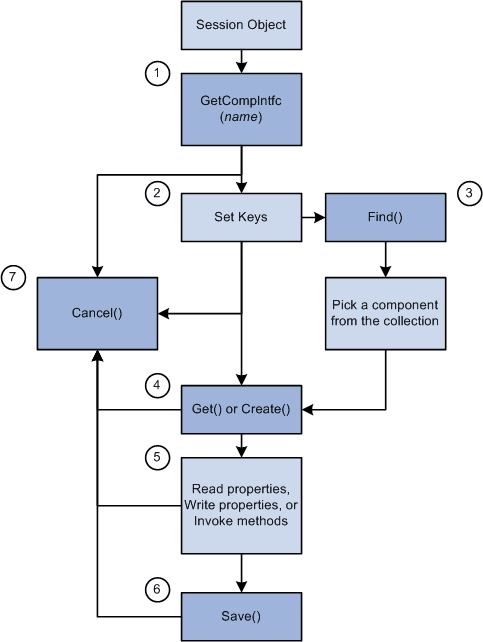
Life Cycle of a Component Interface
At runtime, there are certain things you want to do with a Component Interface, such as getting an instance of it, populating it with data, and so on. The following is an overview of this process. These steps are expanded in other sections.
-
Execute the GetCompIntfc method on the PeopleSoft session object to get a Component Interface.
-
Set the key values for the Component Interface object. If the keys you specify don’t uniquely describe a component (partial keys), proceed to step 3. If the keys uniquely describe a component, skip to step 4.
-
Do one of the following:
-
Execute the Find standard method on the Component Interface. This returns a collection of Component Interfaces with their key values filled out. The user can then select the unique Component Interface they want.
-
Execute either the Get or Create standard method to instantiate the Component Interface (populate it with data.)
-
-
Get property values, set property values, or execute user-defined methods. Setting a property value will fire the standard PeopleSoft business rules for the field associated with the property (any PeopleCode program associated with FieldChange, RowInsert, and so on.)
-
Execute the Save standard method to fire the standard PeopleSoft save business rules (any PeopleCode programs associated with SavePreChange, WorkFlow, and so on.) and commit any changes to the database.
-
At any point, the standard method Cancel can be executed to reset the Component Interface to its state in step 1.
The following is a flow chart diagram of Component interface life cycle such as getting an instance of it, populating it with data, and so on.