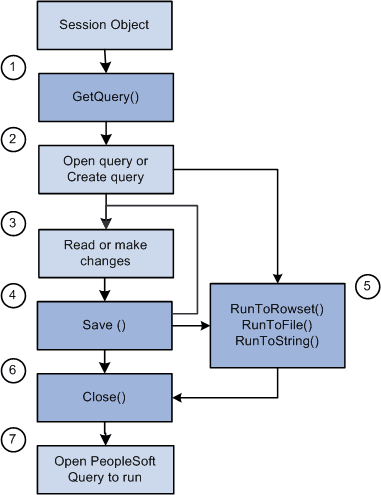
Life Cycle of a Query
At runtime, there are certain things you want to do with a query, like creating one from scratch, updating the criteria for an existing query, running a query, and so on. The following is an overview of this process, and assumes the most common method to use the query API. These steps are expanded in other sections.
-
Invoke the GetQuery method on the PeopleSoft session object to get a query.
-
Either open the specific query you want using Open, or create a new query using Create.
-
Read the query statistics, or make changes as appropriate, adding records, field, criteria, and so on.
-
Save the changes.
-
(Optional) Use the RunToRowset method to run the query.
Note:
Be careful whenever you write a PeopleCode program that uses the RunToRowset method because this method could return a large amount of data that could potentially exceed the memory available. For this reason, RunToRowset should be used only when you know that the query being executed returns a reasonable amount of data, or be sure to use the MaxRows parameter to control the maximum amount of data that can be returned.
Alternatively, you can:
-
Use the RunToFile method to execute a scheduled query.
-
Use the RunToString method to run a query and return the result as a formatted string.
-
-
Close the query.
-
If you want, you can navigate to PeopleSoft Query Manager, Query Viewer or the Query Designer to run the query.
The following diagram is an overview of life cycle of a Query object , illustrates the most common method to use the query API.