MoveToDoc method: Business Interlink class
Syntax
MoveToDoc(list_number)Description
Within a list of documents in the Output structure, the MoveToDoc method moves to the documents given by the parameter list_number. After using MoveToDoc, the GetValue method gets the values of the document that is in the list_number+1 location in the list.
Parameters
| Parameter | Description |
|---|---|
|
list_number |
The number indicating the document that MoveToDoc moves to. After using MoveToDoc, the GetValue method gets the values of the document that is in the list_number+1 location in the list. For example, if list_number is zero, then MoveToDoc moves to the first document in the list. |
Returns
This method returns an integer. The values are:
| Value | Description |
|---|---|
|
0 |
eNoError. The method succeeded. |
|
1 |
eNO_DOCUMENT. The document referenced by this method does not exist. |
|
2 |
eDOCLIST_OUT_RANGE. You tried to access a document in a list, but the document list is out of range. For example, if a document list contains five documents, and then you call GetDoc/GetOutputDocs once, you can call GetNextDoc four times; the fifth time results in this error. |
|
3 |
eDOCUMENT_UNINITIALIZED. Internal error. |
|
4 |
eNOT_DOCUMENTTYPE. You tried to perform an operation upon a parameter that is not a document type. |
|
5 |
eNOT_LISTTYPE. You tried to perform a GetNextDoc or AddNextDoc upon a document that is not a list. |
|
7 |
eNOT_BASICTYPE. You tried to perform a GetValue or AddValue upon a parameter that is not of basic type: Integer, Float, String, Time, Date, DateTime. |
|
8 |
eNO_DATA. You tried to retrieve data from a document that contained no data. |
Example
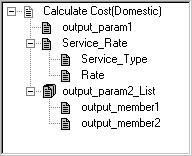
The following example gets the values of the last document in the output_param2_List list. It uses GetCount to get the number of documents in the list, and then uses MoveToDoc to move to the last document in the list.
Local Interlink &QE_COST;
Local number &count;
Local BIDocs &CalcCostOut;
Local BIDocs &OutlistDoc;
Local number &ret;
&QE_COST = GetInterlink(Interlink.QE_COST_EX);
// Get inputs, execute. (code not shown)
&CalcCostOut = &QE_COST.GetOutputDocs("");
&OutlistDoc = &CalcCostOut.GetDoc("output_param2_List");
&count = &CalcCostOut.GetCount("output_param2_List");
&ret = &OutlistDoc.MoveToDoc(&count-1);
&ret = &OutlistDoc.GetValue("output_member1", &VALUE1);
&ret = &OutlistDoc.GetValue("output_member2", &VALUE2);
The following illustration shows the Output structure for this example. It contains three output parameters: output_param1, Service_Rate, and output_param2_List. This is a version of the Federal Express plug-in that was modified for this example (output_param1 and output_param2_List were added).