Sort method: Array class
Syntax
Sort(order)Description
The Sort method rearranges the elements of the array executing the method into an order.
The type of sort done by this function, that is, whether it is a linguistic or binary sort, is determined by the Sort Order Option on the PeopleTools Options page.
If the array is one-dimensional, the elements are arranged in either ascending or descending order.
The type of the first element is used to determine the kind of comparison to be made. Any attempt to sort an array whose elements are not all of the same type results in an error.
If order is "A", the order is ascending; if it is "D", the order is descending. The comparison between elements is the same one as if done using the PeopleCode comparison operators (<, >, =, and so on.)
Note:
If you execute this method on a server, the string sorting order is determined by the character set and localization of the server.
If the array is two-dimensional, the subarrays are arranged in order by the first element of each subarray. Sorting an array whose subarrays have different types of first elements will result in an error. The comparison is done by using the PeopleCode comparison operators (<, >, =, and so on.)
Note:
This method works with arrays that have only one or two dimensions. You receive a runtime error if you try to use this method with an array that has more than two dimensions.
Parameters
| Parameter | Description |
|---|---|
|
order |
Specifies whether the array should be sorted in ascending or descending order. Values for order are: |
| Value | Description |
|---|---|
|
A |
Ascending |
|
D |
Descending |
Returns
None.
Example
The following example changes the order of the elements in array &A to be ("Frank", "Harry", "John").
&A = CreateArray("John", "Frank", "Harry");&A.Sort();&A = CreateArray(CreateArray("John", 1952), CreateArray("Frank", 1957), Create⇒
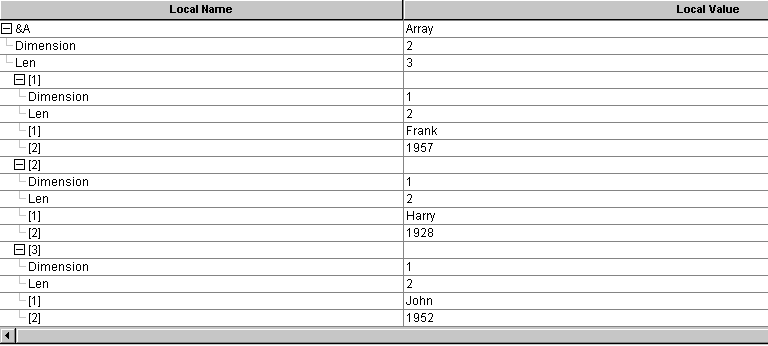
Array("Harry", 1928));The following example changes the order of the elements in array &A to be (("Frank", 1957), ("Harry", 1928), ("John", 1952)).
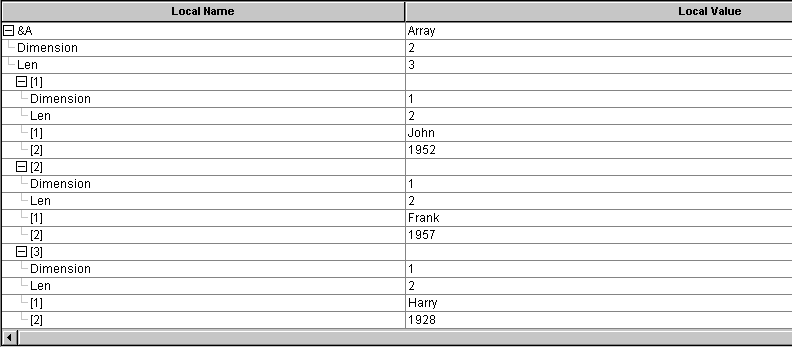
&A.Sort("A");The following image is an example of &A expanded in PeopleCode debugger, showing code results.