Source property: PSMessage class
Description
This property returns a string indicating the actual field that’s in error. The syntax of the string that’s returned is as follows:
ComponentInterfaceName.[CollectionName(Row).[CollectionName(Row).[CollectionName⇒
(Row)]]].PropertyName
The following image is an example of Sample Component Interface. The string here is also returned as part of the Text property. For example, suppose you had a Component Interface named EMPL_CHKLST_CI.
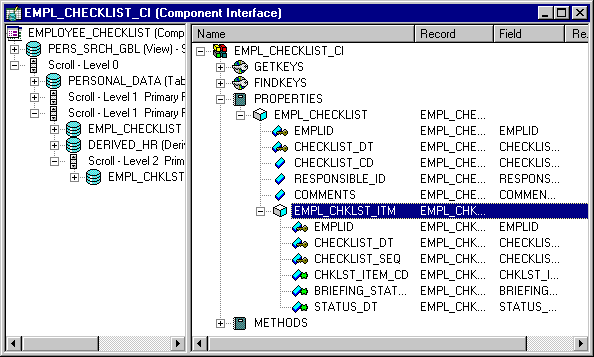
The following indicates that the first level field, EMPLID, has the error:
EMPL_CHKLST_CI.EMPLIDThe Component Interface EMPL_CHKLST_BC has a data collection (scroll) called EMPL_CHKLST_ITM. Suppose that it has 3 rows, and the STATUS_DT field was in error. The Source property would return the following string:
EMPL_CHKLST_CI.EMPL_CHKLST_ITM(3).STATUS_DTYou can use the Source property in conjunction with the MessageNumber property (which contains the error message number), the MessageSetNumber property (which contains the error message set number), the ExplainText property (which contains text explaining the error), and the Text property (which contains the text of the message.)
This property is read-only.
Example
The following example code finds the error messages and displays them to the user. It finds the field that caused the error and displays that also.
Local ApiObject &PSMESSAGE;
Local Boolean &FIND;
Local string &SOURCE, &FIELD, &TEXT;
Local number &START, &LEN, &NSTART, &FLEN;
.
.
.
For &I = 1 to &SESSION.PSMessages.Count;
   &PSMESSAGE = &SESSION.PSMessages.Item(&I);
   /* only display errors, not warnings, to user */
   If &PSMESSAGE.Type = 1 Then
      &TEXT = &PSMESSAGE.Text;
      /* find name of field in error */
      &SOURCE = &PSMESSAGE.Source;
      &LEN = Len(&SOURCE);
      /* find last dot before field */
      &FIND = False;
      &START = Find(".", &SOURCE);
      While Not (&FIND)
         &NSTART = Find(".", &SOURCE, &START + 1);
            If &NSTART = 0 Then
               &FIND = True;
            Else
               &START = &NSTART;
            End-If;
         End-While;
         &FLEN = &LEN - &START;
         &FIELD = Substring(&SOURCE, &START + 1, &FLEN);
         /* display text and field to user */
         Winmessage("You received the following error: " | &TEXT | "For field " |⇒
 &FIELD);
   End-If;
End-For;