TraceName property: SQL class
Description
This property enables you to assign a name to a SQL statement that has been created in PeopleCode using CreateSQL. This name is used in the Application Engine timings trace. This property takes a string value.
Note:
You cannot associate the TraceName property with the execution of a simple SELECT statement created with CreateSQL. This is because the SELECT is executed when the SQL is created, before it has the TraceName assigned. To do this, create a SQL object instead.
If this property isn't set, it defaults to a substring of the SQL statement, indicating the operation and table, (for example, SELECT PS_VOUCHER_LINE.) It may be useful to set TraceName to indicate the origin of the SQL statement.
This property is read/write.
Example
&REC = CreateRecord(Record.VOUCHER_LINE);
&SQL = CreateSQL("%selectall(:1) WHERE BUSINESS_UNIT =:2 AND VOUCHER_ID =:3 AND⇒
 VOUCHER_LINE_NUM = :4");
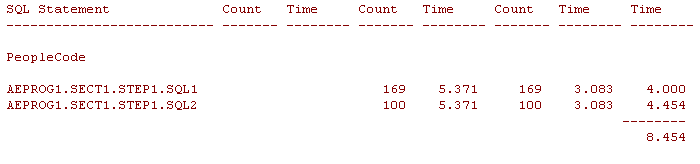
&SQL.TraceName = "AEPROG.SECT1.STEP1.SQL2";
&SQL.Execute(&REC, MATCHING_AET.BUSINESS_UNIT, MATCHING_AET.VOUCHER_ID, &count);
If &SQL.Fetch(&REC) Then
      &count2 = &count2 + 1;
End-If;
The previous example would produce the following in the timings trace.
You can use this parameter with the Open statement also. The following is an example of how this works:
&Sql1 = CreateObject("SQL");
&Sql1.TraceName = "sql1";
&Sql1.Open("Select %FirstRows(1) 'x' FROM psstatus");
&Sql1.Fetch(&Temp);

&Sql2 = CreateObject("SQL");
&Sql2.TraceName = "sql2";
&Sql2.Open("Select 'x' FROM psstatus");
&Sql2.Fetch(&Temp);