Using Hierarchical Data (BIDocs)
A Business Interlink can have hierarchical data. Think of the structure as a tree, with a root doc, node docs, and values. The hierarchical data methods and objects are also referred to as BIDocs.
Input Structures
The following shows an example of an input structure:
This example illustrates the fields and controls on the Example input structure. You can find definitions for the fields and controls later on this page.
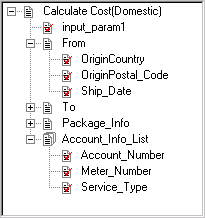
The root doc is Calculate Cost(Domestic). A root doc can contain both values and node docs.
The node docs are From, To, Package_Info and Account_Info_List. Each node can contain both values and child nodes. Node docs can be further described as either:
-
Simple node docs have only one set of values for a single instance of a root doc. From, To, Package_Info are all simple node docs.
-
List node docs can contain more than one set of values for a single instance of a root doc. Account_Info_List is a list node doc.
The values in the From node are OriginCountry, OriginPostal_Code, and Ship_Date. The value within the root node is input_param1. Notice that there are values both within the root doc and within node docs.
Business Interlinks support hierarchical input structures with the following methods:
-
GetInputDocs
-
AddDoc
-
AddValue
-
AddNextDoc
The GetInputDocs method returns a reference to the root doc of an input structure. From the previous example, it returns a reference to Calculate Cost(Domestic).
Use the AddDoc method to access the node docs. From the previous example, you would use AddDoc to access the From, To, Package_Info, and Account_Info_List node docs. If any of these nodes contained nodes, you could use AddDoc to access those as well.
Use the AddValue method to set values. From the previous example, you would use AddValue to set the value for input_param1, OriginCountry, OriginPosta_Code, and Ship_date. You must call AddDoc on a node before you can call AddValue for its values.
Use the AddNextDoc method to access the following:
-
If a node doc is a list, that is, it can contain more than one set of values, use AddNextDoc to reference the next set of values.
-
To add another copy of the entire input structure, use AddNextDoc to return a reference to the next root doc.
The following code example sets values for the node doc From, which is a simple node doc. It also sets the values for Account_Info_List, which is a list node doc.
&Calc_Input = &QE_COST.GetInputDocs("");
&FromDoc = &Calc_Input.AddDoc("From");
&ret = &FromDoc.AddValue("OriginCountry", "United States");
&ret = &FromDoc.AddValue("OriginPostal_Code", &ORIGIN);
&ret = &FromDoc.AddValue("Ship_Date", &SHIPDATE);
&Account_Doc = &Calc_Input.AddDoc("Account_Info_List");
&ret = &Account_Doc.AddValue("Account_Number", "CT-8001");
&ret = &Account_Doc.AddValue("Meter_Number", &METER);
&ret = & Account_Doc.AddValue("Service_Type", &MODE);
/* add next set of values in list */
&ret = &Calc_Input.AddNextDoc();
&ret = &Account_Doc.AddValue("Account_Number", "CT-8002");
&ret = &Account_Doc.AddValue("Meter_Number", &METER);
&ret = &Account_Doc.AddValue("Service_Type", &MODE);
Output Structures
The following shows an example of an output structure:
This example illustrates the fields and controls on the Example output structure. You can find definitions for the fields and controls later on this page.
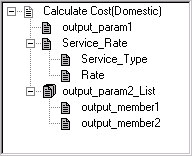
The root doc is Calculate Cost(Domestic).
The node docs are Service_Rate and output_param2_List. Each node can contain both values and child nodes. Node docs can be further be described as either:
-
Simple node docs have only one set of values for a single instance of a root doc. Service_Rate is a simple node doc.
-
List node docs can contain more than one set of values for a single instance of a root doc. output_param2_List is a list node doc.
The values in the Service_Rate node are Service_Type, Rate, and in the output_param2_List node, output_member1 and output_member2, and within the root node, output_param1.
Business Interlinks support hierarchical output structures with the following methods:
-
GetOutputDocs
-
GetDoc
-
GetNextDoc
-
GetPreviousDoc
-
GetStatus
-
GetValue
-
GetCount
-
MoveToDoc
The GetOutputDocs method returns a reference to the root doc of an output structure. From the previous example, it returns a reference to Calculate Cost(Domestic).
Use the GetDoc method to access node docs. From the previous example, you would use GetDoc to access the Service_Rate or output_param2_List node docs. If any of these nodes contain nodes, you use GetDoc to access those as well.
Use the GetValue method to retrieve the values. From the previous example, you would use GetValue to retrieve the values for output_param1, and for the Service_Rate node, to get the values Service_Type, Rate, output_member1, and output_member2. You must call GetDoc on a node before you can call GetValue for its values.
Use the GetNextDoc (or GetPreviousDoc) method to access the following:
-
A reference to the next (or previous, respectively) root doc.
-
If a node doc is a list, that is, can contain more than one set of values, use GetNextDoc to reference the next node doc in the list (or GetPreviousDoc to access the previous node doc in the list.)
Use the GetCount method to return either the number of docs in a list node doc, or the number of root docs. In the example, you can count the number of Calculate Cost(Domestic) nodes or the number of output_param2_list nodes.
Use the MoveToDoc method to move to a particular doc at the root level or to a list node doc. In the example, you can move to a Calculate Cost(Domestic) node or to an output_param2_list_node.
The following code example gets values for the node docs Service Rate, which is a simple node doc. It also sets the values for output_param2_List, which is a list node doc.
&Calc_Input = &QE_COST.GetOutputDocs("");
&Service_Rate_Doc = &Calc_Input.GetDoc("Service_Rate");
&ret = &Service_Rate_Doc.GetValue("Service_Type", "Overnight");
&ret = &Service_Rate_Doc.GetValue("Rate", "50.00");
&Out_Param_Doc = &Calc_Input.GetDoc("output_param2_List");
&ret = &Out_Param_Doc.GetValue("output_member1", "value1");
&ret = &Out_Param_Doc.GetValue("output_member2", "value2");
/* get next set of values in list */
&Account_Doc = &Out_Param_Doc.AddNextDoc();
&ret = &Out_Param_Doc.GetValue("output_member1", "value3");
&ret = &Out_Param_Doc.GetValue("output_member2", "value4");