Using the QuadrantSchema Class
You can attach instances of the QuadrantSchema class to your rating box chart to provide additional information to users. Specifically, you can label quadrants in the rating box chart.
In the following example, six of the nine available quadrants in the rating box chart are associated with a QuadrantSchema object and have custom labels; the other three quadrants are unlabeled.
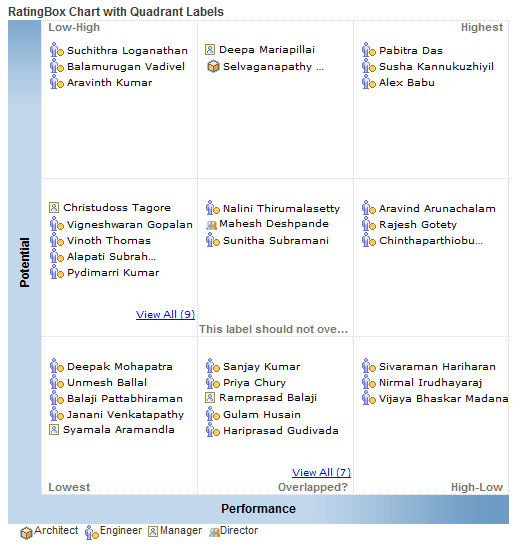
Each label is defined by an instance of QuadrantSchema. These instances are created independently in PeopleCode and then attached as an array to your instance of RatingBoxChart.
For each instance of QuadrantSchema you must specify the x-value/y-value pair that defines the quadrant for the text. You can also specify the location of the text within the quadrant.
The following PeopleCode example demonstrates how to create unique instances of QuadrantSchema, set their properties, and assign them to a rating box chart in order to display a custom label in six rating box quadrants.
/****************** Create Quadrant Schema  1*****************/
&oQuadrantSchema1 = CreateObject("QuadrantSchema");
&oQuadrantSchema1.XRating = "Low";
&oQuadrantSchema1.YRating = "Low";
&oQuadrantSchema1.LabelText = "Lowest";
&oQuadrantSchema1.LabelPosition = %Bottom_Left;

/****************** Create Quadrant Schema  2*****************/
&oQuadrantSchema2 = CreateObject("QuadrantSchema");
&oQuadrantSchema2.XRating = "High";
&oQuadrantSchema2.YRating = "High";
&oQuadrantSchema2.LabelText = "Highest";
&oQuadrantSchema2.LabelPosition = %Top_Right;

/****************** Create Quadrant Schema  3*****************/
&oQuadrantSchema3 = CreateObject("QuadrantSchema");
&oQuadrantSchema3.XRating = "Medium";
&oQuadrantSchema3.YRating = "Medium";
&oQuadrantSchema3.LabelText = "This label should not overflow the quadrant!";
&oQuadrantSchema3.LabelPosition = %Bottom_Right;

/****************** Create Quadrant Schema  4*****************/
&oQuadrantSchema4 = CreateObject("QuadrantSchema");
&oQuadrantSchema4.XRating = "High";
&oQuadrantSchema4.YRating = "Low";
&oQuadrantSchema4.LabelText = "High-Low";
&oQuadrantSchema4.LabelPosition = %Bottom_Right;

/****************** Create Quadrant Schema  5*****************/
&oQuadrantSchema5 = CreateObject("QuadrantSchema");
&oQuadrantSchema5.XRating = "Low";
&oQuadrantSchema5.YRating = "High";
&oQuadrantSchema5.LabelText = "Low-High";
&oQuadrantSchema5.LabelPosition = %Top_Left;
rem &oQuadrantSchema5.LabelPosition = 4;

/****************** Create Quadrant Schema  6*****************/
&oQuadrantSchema6 = CreateObject("QuadrantSchema");
&oQuadrantSchema6.XRating = "Medium";
&oQuadrantSchema6.YRating = "Low";
&oQuadrantSchema6.LabelText = "Overlapped?";
&oQuadrantSchema6.LabelPosition = %Bottom_Right;
Then, the following portion of the program builds an array of these instances and that then associates that array to the instance of RatingBoxChart:
&QuadrantSchemas = CreateArray(&oQuadrantSchema1, &oQuadrantSchema2, &oQuadrantSchema3, &oQuadrantSchema4, &oQuadrantSchema5, &oQuadrantSchema6);

&oRatingBoxChart.SetQuadrantSchemas(&QuadrantSchemas);

/* Reduce clutter in the chart by hiding the axis labels */
&oRatingBoxChart.ShowAxisLabels = False;