WriteRecord Example
In the following example, the File Layout definition is based on the record ABSENCE_HISTORY, and looks like this:
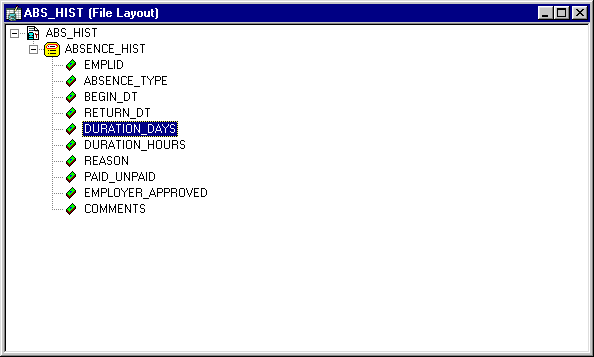
You should note the following about the using the WriteRecord method:
-
Not all the fields in the File Layout definition and the record have to match. The WriteRecord method, like all File Layout methods, applies only to the like-named fields. If there are additional fields in the record or in the File Layout definition, they are ignored.
-
The WriteRecord method writes only to like-named records. If you rename a record after you use it to create a File Layout definition, you must rename it to the exact same name in your File Layout. Because WriteRecord writes like-named records, the same file layout definition can contain more than one record.
-
The WriteRecord method takes a record object as its parameter. A populated record object references a single row of data in the SQL table. This is why a SQL Fetch statement is used in a condition around the WriteRecord method. This fetches every row of data from the SQL table, then writes it to the file.
The following code writes the ABSENCE_HIST record to the file record.txt.
Local Record &RecLine;
Local File &MYFILE;
Local SQL &SQL2;

&MYFILE = GetFile("record.txt", "A", "UTF8");

If &MYFILE.IsOpen Then
   If &MYFILE.SetFileLayout(FileLayout.ABS_HIST) Then
      &RecLine = CreateRecord(RECORD.ABSENCE_HIST);
      &SQL2 = CreateSQL("%Selectall(:1)", &RecLine);
      While &SQL2.Fetch(&RecLine)
         &MYFILE.WriteRecord(&RecLine);
      End-While;
   Else
      /* do error processing -; filelayout not correct */
   End-If;
Else
   /* do error processing -; file not open */
End-If;

&MYFILE.Close();
If you wanted to write only changed records to the file, you could add the following code that is set in bold font:
While &SQL2.Fetch(&RecLine)
   If &RecLine.IsChanged Then
         &MYFILE.WriteRecord(&RecLine);End-If;
End-While;
The following is the first part of a sample data file created by the previous code. The field format is FIXED:
8001       VAC 09/12/1981 09/26/1981 14  0                                  P Y
8001       VAC 03/02/1983 03/07/1983 5   0                                  P Y
8001       VAC 08/26/1983 09/10/1983 13  0                                  P Y
8105       CNF 02/02/1995 ??/??/     0   0                                  U N
8516       MAT 06/06/1986 08/01/1986 56  0                                  P Y
8516       SCK 08/06/1988 08/07/1988 1   0                                  P Y
8516       VAC 07/14/1987 07/28/1987 14  0                                  P Y
8553       JUR 12/12/1990 12/17/1990 5   0   Local Jury Duty                P N
8553       MAT 02/20/1992 10/01/1992 224 0   Maternity Leave                U N
8553       MAT 08/19/1994 03/01/1995 194 0   Maternity-2nd child            U Y
8553       PER 04/15/1993 04/19/1993 4   0                                  U N⇒
 Personal Day required
8553       SCK 01/28/1987 01/30/1987 2   0   Hong Kong Flu                  P N
8553       SCK 08/02/1988 08/03/1988 1   0   Sick                           P N
8553       SCK 09/12/1995 09/13/1995 1   0                                  P N
8641       VAC 06/01/1988 06/15/1988 14  0                                  P Y
8641       VAC 07/01/1989 07/15/1989 14  0                                  P Y
G001       MAT 07/02/1991 09/28/1991 88  0   3-month Maternity leave        P Y⇒
 Maternity will be paid as 80% of Claudia's current salary.
If a record in the File Layout definition has a File Record ID, each line in the file referencing this record is prefaced with this number. The File Record ID is not a field in the data itself. It is also referred to as the rowid. File Record IDs can be useful when the file you’re producing refers to more than one record.
File Record IDs can be used only with File Layout definitions that have a type of FIXED. If a File Layout definition has only one level then File Record IDs can be omitted. But for File Layout definitions with more than one level, you must use File Record IDs.
The following is sample file, produced with the same code, but with a File Record ID of 101 added:
101 8001       VAC 09/12/1981 09/26/1981 14  0                              P Y
101 8001       VAC 03/02/1983 03/07/1983 5   0                              P Y
101 8001       VAC 08/26/1983 09/10/1983 13  0                              P Y
101 8105       CNF 02/02/1995 ??/??/     0   0                              U N
101 8516       MAT 06/06/1986 08/01/1986 56  0                              P Y
101 8516       SCK 08/06/1988 08/07/1988 1   0                              P Y
101 8516       VAC 07/14/1987 07/28/1987 14  0                              P Y
101 8553       JUR 12/12/1990 12/17/1990 5   0   Local Jury Duty            P N
101 8553       MAT 02/20/1992 10/01/1992 224 0   Maternity Leave            U N
101 8553       MAT 08/19/1994 03/01/1995 194 0   Maternity-2nd child        U Y
101 8553       PER 04/15/1993 04/19/1993 4   0                              U N⇒
 Personal Day required
101 8553       SCK 01/28/1987 01/30/1987 2   0   Hong Kong Flu              P N
101 8553       SCK 08/02/1988 08/03/1988 1   0   Sick                       P N
101 8553       SCK 09/12/1995 09/13/1995 1   0                              P N
101 8641       VAC 06/01/1988 06/15/1988 14  0                              P Y
101 8641       VAC 07/01/1989 07/15/1989 14  0                              P Y
101 G001       MAT 07/02/1991 09/28/1991 88  0   3-month Maternity leave    P Y⇒
 Maternity will be paid as 80% of Claudia's current salary.
Note:
File positions start at 1, not 0. When you specify a File Record ID, make sure that the starting position of the Record ID is greater than 0.