WriteRowset Example
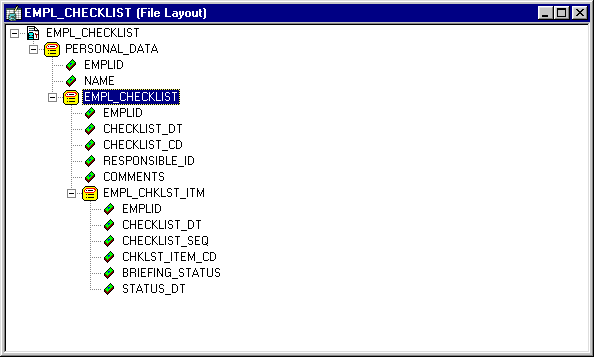
In the following example, the File Layout definition is based on the component EMPL_CHECKLIST, and looks like this:
Here’s the structure of the component EMPLOYEE_CHECKLIST:
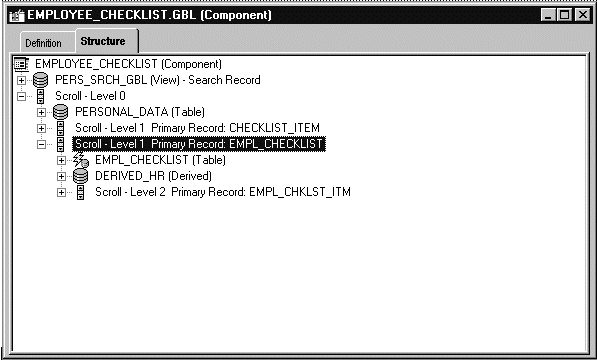
Note that:
-
Every field in the two structures don’t have to match (that is, every field or record that’s in the file layout doesn’t have to be in the component, and vice versa.)
-
The two structures must be the same. That is, if the component has PERSONAL_DATA at level zero, and EMPL_CHECKLIST at level one, the file layout must have the same hierarchy.
The following example uses the previous File Layout definition to copy data from the EMPL_CHECKLIST page into a file.
The CreateRowset function creates an empty rowset that has the structure of the file layout definition. The GetRowset function is used to get all the data from the component and copy it into the rowset. The GetLevel0 function copies all like-named fields to like-named records. The WriteRowset method writes all the component data to the file. Because this code runs on the server, an absolute file path is used.
See PeopleCode Language Reference: GetRowset function.
Example
The following is the PeopleCode for this example.
Local File &MYFILE;
Local Rowset &FILEROWSET;

&MYFILE = GetFile("c:\temp\EMP_CKLS.txt", "A", "UTF8", %FilePath_Absolute);
If &MYFILE.IsOpen Then
   If &MYFILE.SetFileLayout(FILELAYOUT.EMPL_CHECKLIST) Then
      &FILEROWSET = &MYFILE.CreateRowset();
      &FILEROWSET = GetLevel0();
      &MYFILE.WriteRowset(&FILEROWSET, True);
   Else
      /* file layout not found, do error processing */
   End-If;
Else
   /* file not opened, do error processing */
End-if;

&MYFILE.Close();
The following is a sample data file created by the previous code:
8113       Frumman,Wolfgang
           08/06/1999 000001           8219        Going to London office
                     100     000015 I 08/06/1999
                     200     000030 I 08/06/1999
                     300     000009 I 08/06/1999
                     400     000001 I 08/06/1999
                     500     000011 I 08/06/1999
                     600     000002 I 08/06/1999
                     700     000021 I 08/06/1999
                     800     000024 I 08/06/1999
                     900     000004 I 08/06/1999
                     1000    000006 I 08/06/1999
           09/06/1999 000004           7707        What to do after he arrives
                     100     000022 I 08/06/1999
                     200     000008 I 08/06/1999
                     300     000018 I 08/06/1999
                     400     000019 I 08/06/1999
8101       Penrose,Steven
           07/06/1999 000006           8229        New hire
                     1       000033 I 08/06/1999
                     2       000034 I 08/06/1999
                     3       000035 I 08/06/1999
                     4       000036 I 08/06/1999
                     5       000037 I 08/06/1999
                     6       000038 I 08/06/1999
                     7       000039 I 08/06/1999
                     8       000040 I 08/06/1999
                     9       000041 I 08/06/1999
                     10      000042 I 08/06/1999
When you create the File Layout definition, you can choose for each field whether to inherit a value from a higher level record field. If a value is inherited, it is written only once to the file, the first time it's encountered.
In the previous data example, there are three records: PERSONAL_DATA, EMPL_CHECKLIST, and EMPL_CHKLST_ITM. The field EMPLID is on all three records, but is written to the file only the first time a new value is encountered. So, the value for EMPLID is inherited by EMPL_CHECKLIST, and the value for EMPL_CHKLST_ITM is inherited from PERSONAL_DATA. The field CHECKLIST_DT is on EMPL_CHECKLIST and EMPL_CHKLST_ITM. However, the field value appears only once, in the parent record, and not in the child record.
If a record in the File Layout definition has a File Record ID, each line in the file referencing this record will be prefaced with this number. The File Record ID is not a field in the data itself. It is also referred to as the rowid. File Record IDs can be useful when the file being created refers to more than one record. File Record IDs can be used only with File Layout definitions that have a type of FIXED.
The following is sample file, produced with the same code, but with a File Record IDs added to all the records. 001 was added to the first level, 002 to the second, and 003 to the third.
001 8113       Frumman,Wolfgang
002            08/06/1999      000001 8219        Going to London office
003                       100    000015 I 10/13/1999
003                       200    000030 I 10/13/1999
003                       300    000009 I 10/13/1999
003                       400    000001 I 10/13/1999
003                       500    000011 I 10/13/1999
003                       600    000002 I 10/13/1999
003                       700    000021 I 10/13/1999
003                       800    000024 I 10/13/1999
003                       900    000004 I 10/13/1999
003                       1000   000006 I 10/13/1999
002            09/06/1999      000004 7707        What to do after he arrives
003                       100    000022 I 10/13/1999
003                       200    000008 I 10/13/1999
003                       300    000018 I 10/13/1999
003                       400    000019 I 10/13/1999
001 8101       Penrose,Steven
002            10/13/1999      000006 8229        New hire
003                       1      000033 I 10/13/1999
003                       2      000034 I 10/13/1999
003                       3      000035 I 10/13/1999
003                       4      000036 I 10/13/1999
003                       5      000037 I 10/13/1999
003                       6      000038 I 10/13/1999
003                       7      000039 I 10/13/1999
003                       8      000040 I 10/13/1999
003                       9      000041 I 10/13/1999
003                       10     000042 I 10/13/1999