Accessing PeopleCode Editor
When a definition is open in Application Designer, you can access the PeopleCode Editor by:
-
Clicking the View PeopleCode button in the toolbar.
-
Right-clicking the definition and selecting View PeopleCode from the pop-up menu.
-
Selecting the definition and pressing Ctrl + E.
To access the PeopleCode Editor for an Application Class:
-
Double-click the Application Class.
-
Select the Application Class and press Ctrl + E.
Using the View PeopleCode Button in the Toolbar
| Field or Control | Description |
|---|---|
|
|
For definitions where PeopleCode can be inserted, the View PeopleCode button appears in the dynamic Application Designer toolbar. Click this button to launch the PeopleCode Editor and view the PeopleCode associated with the current definition. The View PeopleCode button appears for these definition types:
Note: Depending on the definition type, the label of the button and the number of buttons that appear might be different. For example, with pages, you see two buttons: View Page PeopleCode and View Record PeopleCode. |

Selecting View PeopleCode from the Pop-up Menu
Open a definition in Application Designer, and in the Application Designer workspace, right-click a field, which displays a pop-up menu. Click View PeopleCode to launch the PeopleCode Editor.
Note:
Depending on the definition type, the options to launch PeopleCode Editor might be different. For example, with pages, you see two options: View Page PeopleCode and View Record PeopleCode.
This example illustrates accessing PeopleCode Editor from the current definition open in the Application Designer workspace.
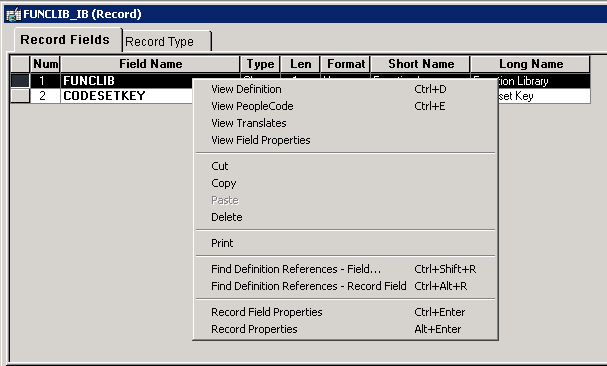
You can also access PeopleCode Editor by selecting the definition and then pressing Ctrl + E on the keyboard.
Accessing PeopleCode Editor for an Application Class
This example illustrates accessing PeopleCode Editor for the Application Class from the Application Designer workspace.
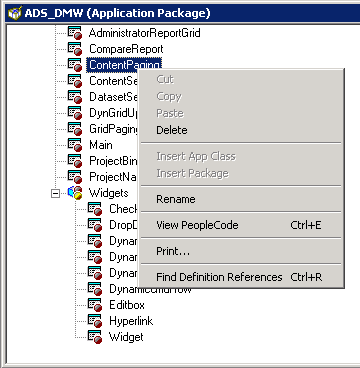
You can either double click on the selected Application Class or press Ctrl + E on the keyboard after selecting the Application Class to access its PeopleCode Editor.