Accessing Record Field PeopleCode from a Page Definition
You can associate a PeopleCode program with any page control that you can associate with a record field.
To access record field PeopleCode from a page definition, right-click a page control and select View Record PeopleCode. The PeopleCode Editor appears, displaying the first event in the event set associated with the underlying record field of that control.
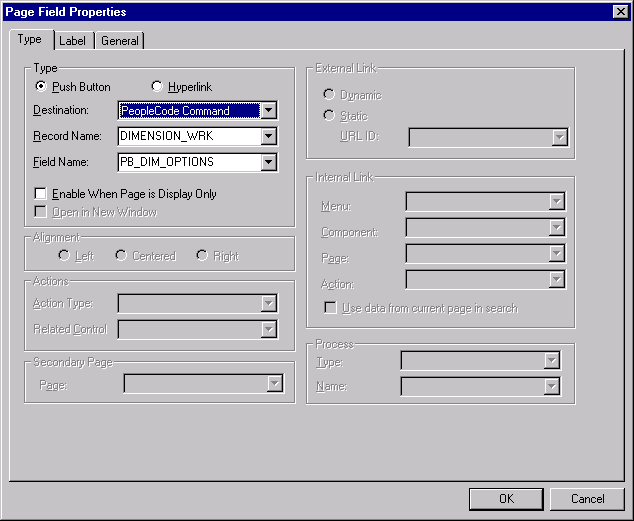
Button controls are a special case. You can associate a PeopleCode program with a button only if its destination is defined as PeopleCode Command. When the user clicks a button defined using this method, the FieldEdit and FieldChange events are triggered, so the PeopleCode must be associated with one of those two events. Typically, you use the FieldChange event. The following example shows button properties:
The following image illustrates Page field properties for buttons.
To define a command button:
-
In the page definition, double-click the button to access its properties.
-
Select PeopleCode Command as the button destination.
-
Select the record and field with which your button and PeopleCode are associated.
You should associate the button with a derived/work record field, which separates its PeopleCode from the PeopleCode associated with any of the page’s other underlying record fields. You can then store generic PeopleCode with this field so that you can reuse it with buttons on other pages.
-
Click OK to return to the page.
Right-click the command button and select View PeopleCode to access the PeopleCode Editor.
Related Topics