Adding Visual Selection Node Indicators
Sometimes, users need a visual indicator, such as a different color or style, to indicate which node is selected. This example shows a selected node style:
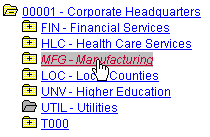
To add selected node highlighting:
-
Add the field NODESELECTEDSTYLE to the TREECTL_HDR_SBR record.
-
Add PeopleCode to set the NODESELECTEDSTYLE field to provide the highlighting effect.
The NODESELECTEDSTYLE field takes the name of a style class.
The following example uses the PSTREENODESELECTED style:
&REC.GetField(Field.NODESELECTEDSTYLE).Value = "PSTREENODESELECTED";You can set the style of the selected node when processing the select event.
Note:
You also must reset the style of the previous selected node when processing the select event. To find the previous selected node, you can search the node rowset looking for a node with a STYLECLASSNAME equal to the style you set for selected nodes. Alternatively, you can keep a global variable with the index of the node in the rowset. If you keep an index variable, however, you may have to update the index when processing the load children event.