Changing Word Wrap in the PeopleCode Editor
The PeopleCode Editor supports text word wrapping. You can turn word wrapping on and off for an open editor window. You can also specify the default value for word wrap, as well as whether the text wraps to the editor's window size or to a fixed number of characters per line.
To turn word wrapping on or off for an open editor window, go to Edit, Word Wrap. After you close Application Designer, all word wrap values are reset to the default value for the editor.
Specifying Word Wrap Options
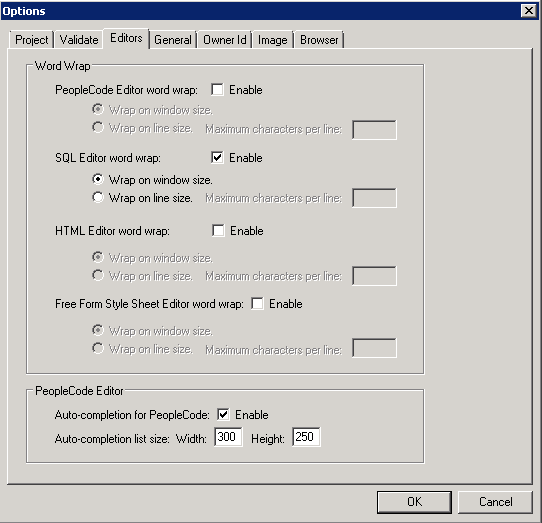
Go to the Tools, Options dialog box, Editors tab, to specify the word wrap options.
This example illustrates the fields and controls on the Options dialog box: Editors tab. You can find definitions for the fields and controls later on this page.
| Field or Control | Description |
|---|---|
|
Enable (word wrap) |
Specify whether word wrap is the default mode when opening the editor. If this box is not checked, wrapping text based on window size is the default. |
|
Wrap on Window Size |
Specify whether the text wraps based on the size of the window. |
|
Wrap on Line Size |
Specify whether the text wraps based on the number of characters in a line. If this box is checked, you can specify the number of maximum number of characters per line. |
|
Maximum Characters per Line |
Specify the maximum number of characters allowed for a line before the text wraps. The default value is 90. Valid values are between 25 and 2000. |