Component Buffer Contents
PeopleCode frequently must refer to data in the component buffer, the area in memory that stores data for the currently active component.
The two methods for specifying a piece of data in the component buffer from within PeopleCode are:
-
Contextual references, which refer to data relative to the location of the currently executing PeopleCode program.
-
References using scroll path syntax, which provide a complete, or absolute, path through the component buffer to the referenced component.
In addition to the built-in functions used to access the component buffer, PeopleCode provides enhanced access to structured data buffers using the object syntax. Use the object-oriented PeopleCode to resolve contextual ambiguities when you reference a nonprimary record field that appears on more than one scroll level in a component. As with built-in functions, object syntax provides for both relative and absolute references to component buffer data.
See Classes and Objects.
The component buffer consists of rows of buffer fields that hold data for the records associated with page controls, including primary scroll records, related display records, derived/work records, and Translate table records. PeopleCode can reference buffer fields associated with page controls and other buffer fields from the primary scroll record and related display records.
See Record Fields and the Component Buffer.
Primary scroll records are the principal SQL tables or views associated with page scroll levels. A primary scroll record uniquely identifies a scroll level in the context of its page: each scroll level can have only one primary scroll record, and the same primary scroll record cannot occur on more than one scroll area at the same level of the page. Parent-child relations between primary scroll records determine the dependency structure of the scroll areas on the page. The primary record on a level one scroll area must be a child of the primary record on level zero, the primary record on a level two scroll area must be a child of the primary record on its enclosing level one scroll area, and the primary record on a level three scroll area must be a child of the primary record on its enclosing level two scroll area.
Note:
Level zero may have multiple records.
The hierarchical relations among scroll areas, controlled by hierarchical relations among primary scroll records, enable the user and PeopleCode to drill down through the scroll hierarchy to access any buffer field, including related display, derived/work, and Translate table buffer fields, which occupy space on the same rows as the primary scroll record buffer fields with which they are associated.
For example, to access a page field on level two of a page, a user must:
-
Select a field on level one of the page.
-
Scroll to and select the field on level two of the page.
The following diagram illustrates the scroll path taken by the user to a buffer field.
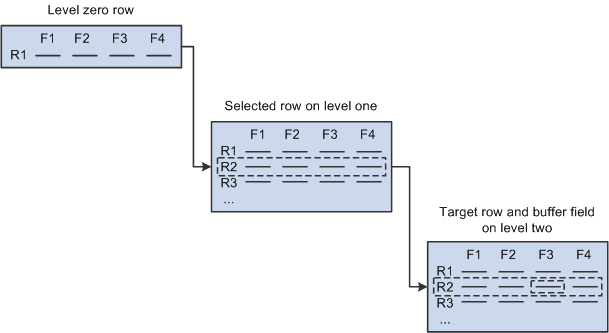
To access the same field in the component buffer, PeopleCode must:
-
Specify a scroll area and row on scroll level one: this selects a subset of dependent rows on level two.
-
Specify a scroll area and row on scroll level two.
-
Specify the recordname.fieldname on the level two row.
PeopleCode component buffer functions use a common scroll path syntax for locating scrolls, rows, and fields in multiple-scroll pages.