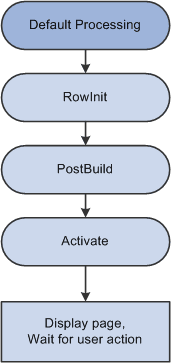
Component Processor Behavior from Page Start to Page Display
Before a user selects a component, the system is in reset state, in which no component is displayed. The Component Processor flow of execution begins when a user selects a component from a PeopleSoft menu. The Component Processor then:
-
Performs search processing, in which it obtains and saves search key values for the component.
-
Retrieves from the database server any data needed to build the component.
-
Builds the component, creating buffers for the component data.
-
Performs any additional processing for the component or the page.
-
Displays the component and waits for user action.
The following flowchart shows the behavior of a component processor from page start to page display at a high level: