Execution Order of Events and PeopleCode
In PeopleSoft systems,
the component is the representation of a transaction. Therefore, any
PeopleCode that is associated with a transaction should be in events
associated with some level of the component itself (component, component
record, or component record field). If you associate code with the
correct transaction, you do not have to check for the component that
is issuing it (such as surrounding your code with dozens of If %Component = statements). Consequently, this makes record definitions more reusable,
and your code is more maintainable. However, code that should be executed
every time a field is edited should be at the record field level and
not placed on the component.
For example, if you have start and end dates for a course, you would always want to make sure that the end date was after the start date. Your program to check the dates would go on the SaveEdit at the record field level.
All similarly named component events are executed after the like-named record event. The PeopleCode program associated with the record field event is executed first, and then the PeopleCode program associated with the like-named component event is executed. If you set the value of a field with the record field PeopleCode, and then reset the field with like-named component PeopleCode, the second value is displayed to the user.
Events After Field Changes
The following events occur after a user changes a field:
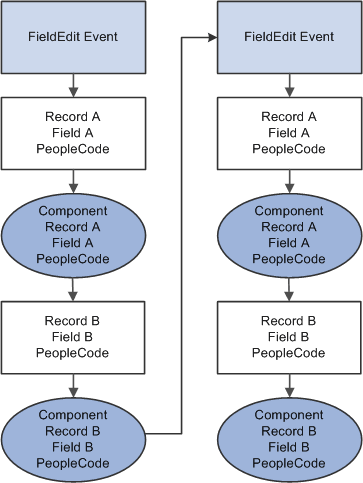
Record.recordA.fielda.FieldEdit -> Component.recordA.fielda.FieldEdit ->
Record.recordB.fieldb.FieldEdit -> Component.recordB.fieldb.FieldEdit ->
Record.recordA.fielda.FieldChange -> Component.recordA.fielda.FieldChange ->
Record.recordB.fieldb.FieldChange -> Component.recordB.fieldb.FieldChange ->
The following diagram shows the flow of events and PeopleCode programs after a user changes a field.
Events After User Saves
The following events occur after a user saves:
Record.recordA.fielda.SaveEdit ->
Record.recordA.fieldb.SaveEdit ->
Record.recordA.fieldc.SaveEdit ->
Component.recordA.SaveEdit

Record.recordB.fielda.SaveEdit ->
Record.recordB.fieldb.SaveEdit ->
Record.recordB.fieldc.SaveEdit ->
Component.recordB.SaveEdit

Record.recordA.fielda.SavePreChange ->
Record.recordA.fieldb.SavePreChange ->
Record.recordA.fieldc.SavePreChange ->
Component.recordA.SavePreChange

Record.recordB.fielda.SavePreChange ->
Record.recordB.fieldb.SavePreChange ->
Record.recordB.fieldc.SavePreChange ->
Component.recordB.SavePreChange

Record.recordA.fieldA.WorkFlow ->
Record.recordB.fieldB.WorkFlow ->
Record.reocrdC.fieldC.WorkFlow
Component.Workflow

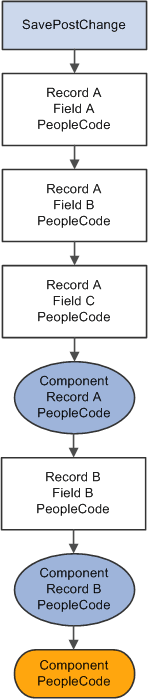
Record.recordA.fielda.SavePostChange ->
Record.recordA.fieldb.SavePostChange ->
Record.recordA.fieldc.SavePostChange ->
Component.recordA.SavePostChange

Record.recordB.fielda.SavePostChange ->
Component.recordB.SavePostChange
Component.SavePostChange
The following diagram shows the event flow of PeopleCode programs after SavePostChange event.
Note:
SaveEdit does not fire for deleted rows, but SavePreChange, Workflow, and SavePostChange do.