Finding Definition References
After you have compiled and saved all PeopleCode, you can search for references to application packages or application classes or application class methods:
-
In Application Designer, open the application package in the Application Package Editor.
-
In the application package structure, browse to the application package or application class or application class method for which you want to find definition references.
-
Select Edit, Find Definition References, or right-click the definition and select Find Definition References from the pop-up menu.
Note:
When you want to find definition references for record definition or field definition, the Find Definition References dialog box displays a set of options for filtering the definition types.
For more information on search filters for record and field definitions, see Application Designer Developer’s Guide: Finding Definition References.
This example illustrates the fields and controls on the Finding definition references for an application class. You can find definitions for the fields and controls later on this page.
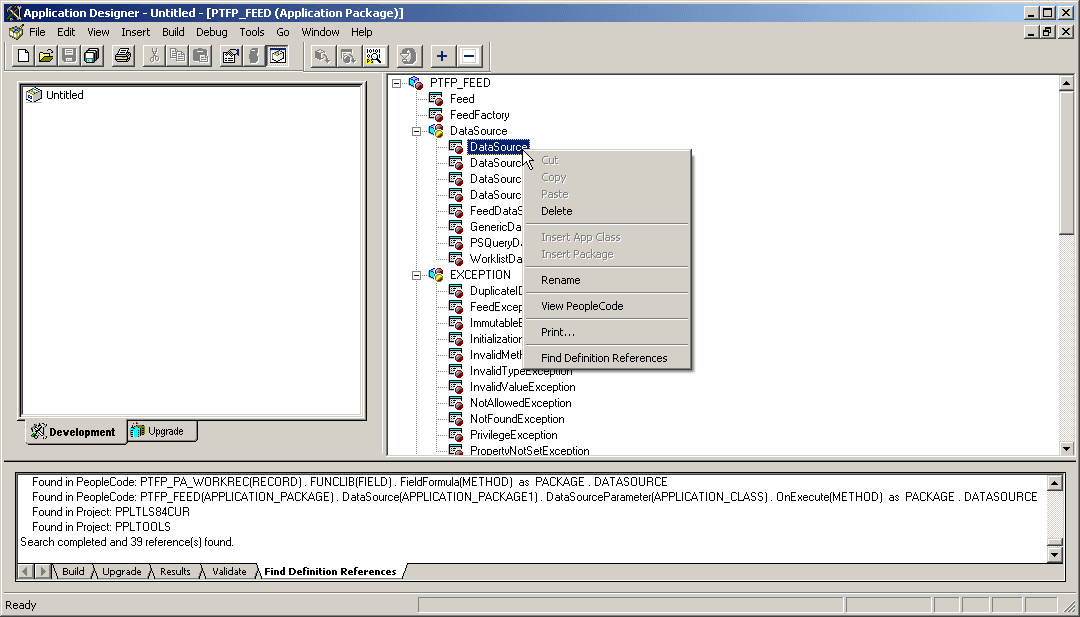
After you select this item, a search of the database takes place, and the results appear on the Find Definition References tab of the output window.
-
Select any definition that is displayed in the Find Definition References tab by double-clicking it.
The selected definition opens in the editor.
Note:
Find definition references will not find an application package or class name when it appears in a PeopleCode comment or when the name appears in a string literal (that is, within quotes). Use the Find In feature instead.
Related Topics