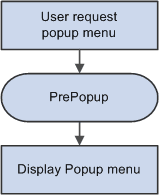
Pop-Up Menu Display
To display a pop-up menu, a user can click the pop-up button, either next to a field or at the bottom of a page (if the page has a pop-up menu associated with it.) The user can open a standard pop-up menu on a page field if no pop-up menu has been defined by an application developer for that page field.
The PrePopup PeopleCode event initiates only if the user opens a pop-up menu defined by an application developer on a page field. It does not initiate for a pop-up menu attached to the page background.
The PrePopup PeopleCode event enables you to disable, check, or hide menu items in the pop-up menu.
PrePopup PeopleCode menu item operations (such as HideMenuItem, EnableMenuItem, and so on) work with pop-up menus attached to a grid, not a field in a grid, only if the PrePopup PeopleCode meant to operate on that pop-up menu resides in the record field that is attached to the first column in the grid. It does not matter if the first field is visible or hidden.
The following flowchart shows the logic of PrePopup event processing, which enables the user to disable, check, or hide menu items in the pop-up menu.