Referencing Scroll Levels, Rows, and Buffer Fields
You can reference a scroll level using the scrollpath construct only. Functions that reference rows for buffer fields require additional parameters. The following table summarizes the three types of component buffer references:
| Target Component | Reference Syntax | Example Function |
|---|---|---|
|
Scroll level |
|
|
|
Row |
|
|
|
Field |
|
|
PeopleTools 8 provides an alternative to the scroll level, row, and field components in the form of the data buffer classes Rowset, Row, Record, and Field, which you reference using dot notation with object methods and properties. The following table demonstrates the syntax for instantiating and manipulating objects in the current context from these classes:
| Target Object | Example Instantiation | Example Operation |
|---|---|---|
|
Rowset |
|
|
|
Row |
|
|
|
Record |
|
|
|
Field |
|
|
The following sections provide examples of functions using scroll path syntax, which refer to an example page from a fictitious veterinary clinic database. The page has three scroll levels, shown in the following table:
| Level | Scroll Name (Primary Scroll Record Name) |
|---|---|
|
0 |
VET |
|
1 |
OWNER |
|
2 |
PET |
|
3 |
VISIT |
The examples given for PeopleTools 8 object-oriented syntax assumes that the following initializing code was executed:
Local Rowset  &VET_SCROLL, &OWNER_SCROLL, &PET_SCROLL, &VISIT_SCROLL;

&VET_SCROLL = GetLevel0();
&OWNER_SCROLL = &VET_Scroll.GetRow(1).GetRowSet(Scroll.OWNER);
&PET_SCROLL = &OWNER_Scroll.GetRow(2).GetRowSet(Scroll.PET);
&VISIT_SCROLL = &PET_Scroll.GetRow(2).GetRowSet(Scroll.VISIT);
Referring to Scroll Levels
The HideScroll function provides an example of a reference to a scroll level. The syntax of the function is:
HideScroll(scrollpath)where scrollpath is
[Record.level1_recname, level1_row, [Record.level2_recname, level2_row,]] Record.⇒
target_recname
To reference the level 1 scroll in the example, use this syntax:
HideScroll(Record.OWNER);This hides the OWNER, PET, and VISIT scroll areas on the example page.
In PeopleTools 8, the object-oriented version of this is:
&OWNER_Scroll.HideAllRows();To hide scroll levels two and below, supply the primary record and row in scroll level one, and then the record identifying the target scroll area:
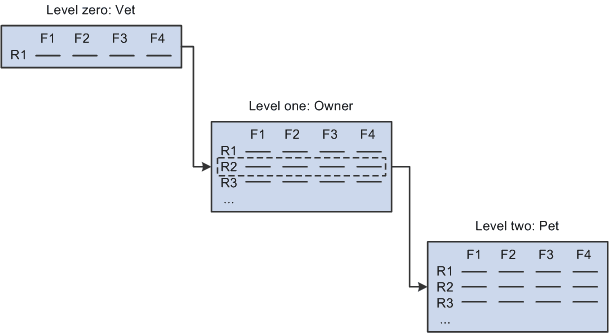
HideScroll(Record.OWNER, &L1ROW, Record.PET);The following diagram shows the scroll path of this statement, assuming that the value of &L1ROW is 2:
Similarly, to hide the VISIT scroll area on level three, you specify rows on scroll levels one and two.
HideScroll(Record.OWNER, &L1ROW, Record.PET, &L2ROW, Record.VISIT);To use the Scroll.scrollname syntax, the previous example could be written as the following:
HideScroll(Scroll.OWNER, &L1ROW, Scroll.PET, &L2ROW, Scroll.VISIT);In PeopleTools 8, the object-oriented version of this is:
&VISIT_Scroll.HideAllRows();Referring to Rows
Referring to rows is the same as referring to scroll areas, except that you need to specify the row you want to select on the target scroll area. As an example, examine the HideRow function, which hides a specific row in the level three scroll area of the page. Here is the function syntax:
HideRow(scrollpath, target_row)To hide row number &ROW_NUM on level one:
HideRow(Record.OWNER, &ROW_NUM);To do the same using the Scroll.scrollname syntax:
HideRow(Scroll.OWNER, &ROW_NUM);In PeopleTools 8, the object-oriented version of this for the OWNER rowset is:
&OWNER_SCROLL(&ROW_NUM).Visible = False;On level two:
HideRow(Record.OWNER, &L1_ROW), Record.PET, &ROW_NUM);In PeopleTools 8, the object-oriented version of this for the PET rowset is:
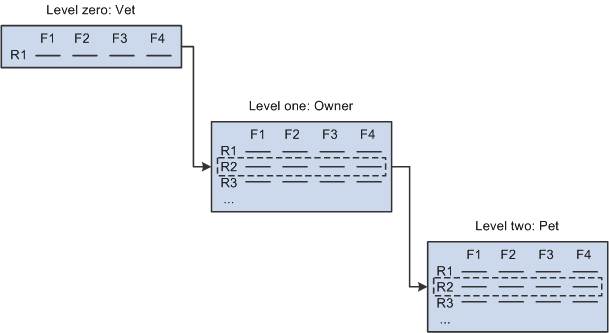
&PET_SCROLL(&ROW_NUM).Visible = False;The following diagram indicates the scroll path of this statement, assuming that the value of &L1_ROW is 2 and that &ROW_NUM is equal to 2:
On level three:
HideRow(Record.OWNER, CurrentRowNumber(1), Record.PET,
CurrentRowNumber(2), Record.VISIT, &ROW_NUM);
In PeopleTools 8, the object-oriented version of this for the VISIT rowset is:
&VISIT_SCROLL(&ROW_NUM).Visible = False;Referring to Buffer Fields
Buffer field references require a [recordname.]fieldname parameter to specify a record field. The combination of scroll level, row number, and record field name uniquely identifies the buffer field. Here is the syntax:
FetchValue(scrollpath, target_row, [recordname.]fieldname)Assume, for example, that record definitions in the veterinary database have the following fields that you want to reference:
| Record | Sample Field |
|---|---|
|
OWNER |
OWNER_NAME |
|
PET |
PET_BREED |
|
VISIT |
VISIT_REASON |
You could use the following examples to retrieve values on levels one, two, or three from a PeopleCode program executing on level zero.
To fetch a value of the OWNER_NAME field on the current row of scroll area one:
&SOMENAME = FetchValue(Record.OWNER, &L1_ROW, OWNER.OWNER_NAME);In PeopleTools 8, the object-oriented version of this for the OWNER rowset is:
&SOMENAME = &OWNER_SCROLL(&L1_ROW).OWNER.OWNER_NAME;To fetch PET_BREED on level two:
&SOMEBREED = FetchValue(Record.OWNER, &L1_ROW, Record.PET, &L2_ROW, PET.PET_BREED);In PeopleTools 8, the object-oriented version of this for the PET rowset is:
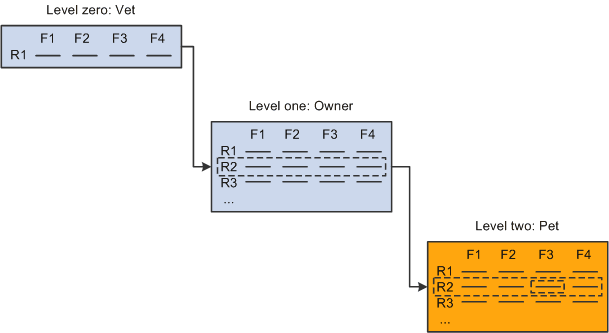
&SOMEBREED = &PET_SCROLL(&L2_ROW).PET.PET_BREED;The following diagram indicates the scroll path to the target field, assuming that &L1_ROW equals 2, &L2_ROW equals 2, and field F3 is PET.PET_BREED.
To fetch VISIT_REASON on level three:
&SOMEREASON = FetchValue(Record.OWNER, &L1_ROW, Record.PET,
&L2_ROW, Record.VISIT, &L3_ROW, VISIT.VISIT_REASON);
To do the same using the Scroll.scrollname syntax:
&SOMEREASON = FetchValue(Scroll.OWNER, &L1_ROW, Scroll.PET,
&L2_ROW, Scroll.VISIT, &L3_ROW, Scroll.VISIT_REASON);
In PeopleTools 8, the object-oriented version of this is:
&SOMEREASON = &VISIT_SCROLL(&L3_ROW).VISIT.VISIT_REASON;Using CurrentRowNumber
The CurrentRowNumber function returns the current row, as determined by the current context, for a specific scroll level in the active page. CurrentRowNumber is often used to determine a value for the level1_row and level2_row parameters in scroll path constructions. Because current row numbers are determined by the current context, CurrentRowNumber cannot determine a current row on a scroll level outside the current context (a scroll level below the level where the PeopleCode program is currently executing).
For example, you could use a statement like this to retrieve the value of a buffer field on level three of the PET_VISITS page, in a PeopleCode program executing on level two:
&VAL = FetchValue(Record.OWNER, CurrentRowNumber(1),
Record.PET, CurrentRowNumber(2), Record.VISIT, &TARGETROW,
VISIT_REASON);
Because the PeopleCode program is executing on level two, CurrentRowNumber can return values for levels one and two, but not three, because level three is outside of the current context and has no current row number.
Looping Through Scroll Levels
Component buffer functions are often used in For loops to loop through the rows on scroll levels below the level where the PeopleCode program is executing. The following loop, for example could be used in PeopleCode executing on a level two record field to loop through rows of data on level three:
For &I = 1 To ActiveRowCount(Record.OWNER,
CurrentRowNumber(1), Record.PET, CurrentRowNumber(2), Record.VISIT)
    &VAL = FetchValue(Record.OWNER, CurrentRowNumber(1),
Record.PET, CurrentRowNumber(2), Record.VISIT, &I, VISIT_REASON);
   If &VAL = "Fleas" Then
      /* do something about fleas */
   End-If;
End-For;
A similar construct may be used in accessing other level two or level one scroll areas, such as work scroll areas.
In these constructions, the ActiveRowCount function is often used to determine the upper bounds of the loop. When ActiveRowCount is used for this purpose, the loop goes through all of the active rows in the scroll (rows that have not been specified as deleted). If you use TotalRowCount to determine the upper bounds of the loop, the loop goes through all of the rows in the scroll area: first those that have not been specified as deleted, then those that have been specified as deleted.