Understanding Modal Transfers
When you use modal transfers to transfer from one component (the originating component) to another component (the modal component), the user must click the OK or Cancel buttons on the modal component before returning to the originating component.
Modal transfers provide some control over the order in which the user fills in pages, which is useful where data in the originating component can be derived from data entered by the user into the modal component.
Limit use of this feature, as it forces users to complete interaction with the modal page before returning to the main component.
Note:
Modal transfers cannot be initiated from SearchInit PeopleCode.
A modal component resembles a Microsoft Windows modal dialog box. It displays three buttons: OK, Cancel, and Apply. No toolbars or windows are available while the modal component has the focus. The OK button saves changes to the modal component and returns the user to the originating component. The Apply button saves changes to the modal component without returning to the originating component. The Cancel button returns the user to the originating component without saving changes to the modal component.
Modal components are generally smaller than the page from which they are invoked. Remember that OK and Cancel buttons are added at runtime, thus increasing the size of the pages.
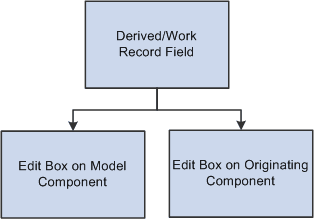
The originating component and the modal component share record fields in a derived/work record called a shared work record. The derived/work fields of this record provide the two components with an area in memory where they can share data. Edit boxes in both components are associated with the same derived/work field, so that changes made to this field in the originating component are reflected in the modal component, and vice versa. The following diagram illustrates this shared memory:
The following diagram explains that the Edit boxes on the originating and modal components share the same data.
Edit boxes associated with the same derived/work fields must be placed at level zero in both the originating component and the modal component.
You can use the shared fields to:
-
Pass values assigned to the search keys in the modal component search record.
If these fields are missing or invalid, the search page appears, enabling the user to enter search keys.
-
Pass other values from the originating component to the modal component.
-
Pass values back from the modal component to the originating component.
Modeless Windows
In addition to modal secondary windows, you can create modeless secondary windows. A modeless window is different from a modal window launched by any of the DoModal* functions in that its state is separate from that of the parent, launching component. When a modeless window is launched from a classic component using the TransferModeless function, the modeless window does not mask the parent window, which allows the user to update the modeless and parent window from the same browser session at the same time.
However, when a modeless window is launched from a fluid component using either the ViewContentURLModeless or ViewURLModeless functions, the parent window is masked and cannot be accessed until the modeless window is dismissed. In this respect and from the user’s perspective, a modeless window launched from a fluid component operates similar to a modal window; but programmatically, its state is separate from that of the parent, launching component.
Similar to modal, secondary windows opened by any of the DoModal* functions, the modeless window does not include the browser title bar, browser menus, and the browser tool bars, status bar, and tool icons associated with most browser windows.
Note:
While the title bar of a modeless window includes an X (or cancel) button, it cannot include any custom buttons.
Important:
Only one active child modeless window can be open at one time. Therefore, after opening a modeless child window from the parent, you cannot open a second modeless child window from that modeless window. However, you can open a modal window from that modeless window.