Understanding Package Names
You can create a subpackage with the same name as another package or subpackage within the same application package definition, as long as the fully qualified name is unique for each subpackage. Each subpackage is differentiated by the full path name of the class (from the package definition name and the subpackage name).
The following is an example of application package naming conventions, which shows a case where in, suppose in the application class PT_FRUIT, where PT_FRUIT is the primary class, you had the following structure of subpackages (no classes are listed in this example):
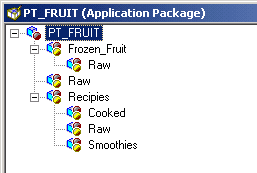
In this example, three subpackages are named Raw, but the fully qualified name for each is unique. For example, the first one is qualified by the name of the primary package. Its fully qualified name is PT_FRUIT:Raw.
The other Raw subpackages are also qualified by the subpackages that contain them. Their names are PT_FRUIT:Reciepies:Raw and PT_FRUIT:Smoothies.Raw.
Similarly, you cannot create two classes with the same name within a given package or subpackage. You can create classes with the same name within the same application package definition, just like subpackages, as long as the fully qualified name is unique. Each class is differentiated by the full path name of the class.
Note:
You cannot create a structure for which more than two levels of subpackages are defined below the primary package.