Using the HTML Sanitizer
Setting Up the HTML Sanitizer
The HTML sanitizer is used to scan and sanitize HTML files uploaded with the AddAttachment and MAddAttachment functions. To use the HTML sanitizer, you configure a allowlist file to specify the files to be scanned and sanitized by file extension along with the specific HTML tags to be allowed.
Note:
If virus scanning is also configured on this web server, virus scanning is performed on the file before the HTML sanitizer is run.
To enable and configure the HTML sanitizer on your web server:
-
Locate the HTMLAllowlist.xml file for WebLogic server:
PS_CFG_HOME\webserv\web_server\applications\peoplesoft\PORTAL.war\WEB-INF\classes\psft\pt8\htmlsanitizer\ -
Edit the HTMLAllowlist.xml file to enable the HTML sanitizer:
<Sanitizer enable="True"> -
Explicitly specify each file extension that you want to be scanned and sanitized. In the following example, only files with an extension of html will be scanned and sanitized. All other files will not pass through the HTML sanitizer:
    <AppliedFileExtentions>
        <Extention>html</Extention>
<!-- <Extention>htm</Extention>
        <Extention>shtml</Extention>
        <Extention>xhtml</Extention>
        <Extention>hta</Extention> -->
    </AppliedFileExtentions>
Note:
File extension specifications are case sensitive; HTML and hTML are not equivalent to html.
-
Identify the tags that you want to be allowed (written) as tags themselves in the HTML output.
-
Identify the tags for container elements— for example, <html>, <head>, and <body>.
-
Identify the tags for content elements—for example, <p>, headings (<h1>, <h2>, and so on), lists (<ol>, <ul>, <li>), and other content elements.
-
Identify the tags for additional content attributes—for example, <id>, <src>, <height>, and so on.
-
If a tag is not specified in the allowlist file, then the tag itself will be stripped from the HTML output. However, the content of the tag will still be allowed in the output.
-
Conversely, to strip the content of the tag (but not the tag itself), use allowtext="False".
-
-
Explicitly specify each tag for the container elements as well as whether to allow untagged text content within those container tags. The following example allows the <html>, <head>, and <body> tags along with untagged text:
    <Element name="html" allowtext="True">
    </Element>
    <Element name="head" allowtext="True">
    </Element>
    <Element name="body" allowtext="True">
    </Element>
Note:
Allowing untagged text within a container element will ensure that line breaks are not stripped from files that pass through the HTML sanitizer.
-
Explicitly specify each tag for content elements and their attributes. As an example, the following entries allow <title>, <p>, and <b> tags. However, the text within the <b> tag is disallowed and stripped from the HTML output:
        <Element name="p" allowtext="True">
        </Element>
        <Element name="b" allowtext="False">
        </Element>
        <Element name="title" allowtext="True">
        </Element>
In this example, the src attribute is allowed for the <img> tag:
       <Element name="img" allowtext="False">
            <Attribute name="src">
            </Attribute>
        </Element>
Testing the HTML Sanitizer
You can use the PeopleTools Test Utilities page to test the settings you’ve made in the HTMLAllowlist.xml file. To test the HTML sanitizer:
-
Select .
-
In the URL Id or String URL field, enter the following URL ID: URL.FILEDB
-
Click the Attach button and browse to select an HTML file to upload for the test.
-
Click the View button to view the sanitized file in a new browser tab. Click the Detach button to download the sanitized file.
If the file is uploaded successfully and no problems are encountered by the HTML sanitizer, the AddAttachment or MAddAttachment function returns %Attachment_Succeeded. If a problem is encountered, the PeopleCode function returns one the following return codes (which are the same codes as used by the virus scan engine):
| Numeric Value | Constant Value | Description |
|---|---|---|
|
13 |
%Attachment_ViolationFound |
File violation detected by HTML sanitizer. |
|
14 |
%Attachment_VirusScanError |
HTML sanitizer error. |
|
15 |
%Attachment_VirusConfigError |
HTML sanitizer configuration error. |
|
16 |
%Attachment_VirusConnectError |
HTML sanitizer connection error. |
Example
The following example presents:
-
An example of a configured HTMLAllowlist.xml file.
-
A sample HTML input file.
-
The HTML output of the HTML sanitizer.
Example HTMLAllowlist.xml
The following code provides an example of a simple allowlist file to demonstrate the inclusion and exclusion of tags as well as the effects of the allowtext setting:
<?xml version="1.0" encoding="UTF-8"?>
<!--HTML white listing configuration file -->
<Sanitizer enable="True">
    <AppliedFileExtentions>
        <Extention>html</Extention>
<!--    <Extention>htm</Extention>
        <Extention>shtml</Extention>
        <Extention>xhtml</Extention>
        <Extention>hta</Extention> -->
    </AppliedFileExtentions>

    <Element name="html" allowtext="True">
    </Element>
    <Element name="head" allowtext="True">
        <Element name="title" allowtext="True">
        </Element>
    </Element>
    <Element name="body" allowtext="False">
        <Element name="p" allowtext="True">
        </Element>
        <Element name="b" allowtext="False">
        </Element>
        <Element name="style" allowtext="True">
        </Element>

<!--        <Element name="img" allowtext="False">
            <Attribute name="src">
            </Attribute>
        </Element>
        <Element name="a" allowtext="True">
           <Attribute name="href">
                <AllowURL>True</AllowURL>
                <RegularExp>(?:ht|f)tps?:.*</RegularExp>
           </Attribute>
        </Element>
        <Element name="h1" allowtext="True">
        </Element>
    </Element> -->
    </Element>
</Sanitizer>
Sample HTML File
The following code presents the contents of a simple HTML file. The line numbers are included for reference only and are not part of the file:
[01]  <!DOCTYPE html>
[02]  <html>
[03]  <head>
[04]  <title>
[05]  A Simple HTML Document
[06]  </title>
[07]  </head>
[08]  <body>
[09]  <h1>The Heading</h1>
[10]  <p>This is a very simple HTML document. One sentence uses <b>bold</b>.</p>
[11]  <p>It only has two paragraphs. Another sentence uses <i>italics</i>.</p>
[12]  </body>
[13]  </html>
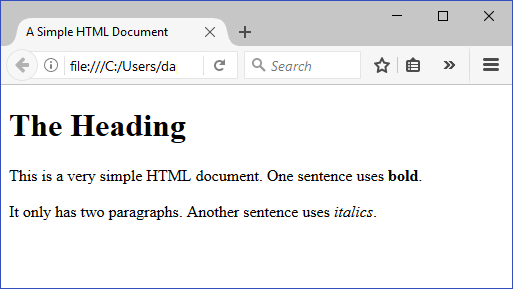
The browser displays this example HTML file as follows:
Example of Sanitized HTML Output
The following code presents the sanitized HTML output of the simple HTML file. Similarly, the line numbers are included for reference only and are not part of the file:
[01]
[02]  <html>
[03]  <head>
[04]  <title>
[05]  A Simple HTML Document
[06]  </title>
[07]  </head>
[08]  <body>The Heading<p>This is a very simple HTML document. One sentence uses <b></b>.</p><p>It only has two paragraphs. Another sentence uses italics.</p></body>
[09]  </html>
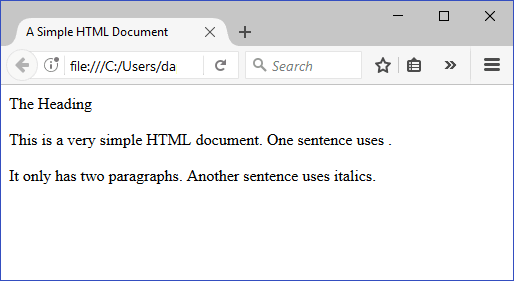
The browser displays this sanitized HTML output file as follows: