Variable Declaration
Declare variables before you use them. If you do not declare a variable, it is automatically declared with the scope Local and the data type Any. You receive a warning message in the Validation tab of the PeopleSoft Application Designer output window for every variable that is not declared when you save the PeopleCode program, as shown in the following example:
The following image shows the validation tab with auto-declared variables.
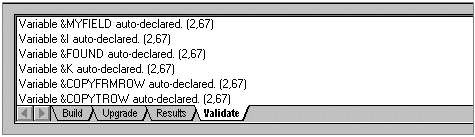
If you declared all the variables, you can use these values to ensure you do not have misspellings. For example, if you declared a variable as &END_DATE and then accidentally spell it as &EDN_DATE, the “new variable” appears on the Validate tab when you save the program.
Another reason to declare variables is for the design-time checking. If you declare a variable of one data type and then assign to it a value of a different type, the PeopleCode Editor catches that assignment as a design-time error when you try to save the program. With an undeclared variable, the assignment error does not appear until runtime.
The following example produces a design-time error when you try to save the program:
Local Field &DATE;
&DATE = GetRecord(RECORD.DERIVED_HR);
In addition, if you declare variables, the Find Object Reference feature finds embedded definitions. For example, suppose you wanted to find all occurrences of the field DEPT_ID. If you have not declared &MyRecord as a record, Find Object References does not find the following reference of the field DEPT_ID:
&MyRecord.DEPT_ID.Visible = False;