DoModalXComponent function
Syntax
DoModalXComponent(showInModal, cancelButtonName, MenuName.MENU_NAME, BarName.BAR_NAME, ItemName.MENU_ITEM_NAME, Page.COMPONENT_ITEM_NAME, action, Record.SHARED_RECORD_NAME [, keylist])In which keylist is a list of field references in the form:
[recordname.]field1 [, [recordname.]field2].
. .
Or in which keylist is a list of field references in the form:
&RecordObject1 [, &RecordObject2]. . .Description
Use the DoModalXComponent function to display a secondary component modally when you do not want it to display in a modal, secondary window. Instead, the component to be displayed completely replaces the primary window when the showInModal parameter is set to False. Similar to DoModalComponent, the user must complete work on the secondary component before continuing work in the page from which the secondary component was called.
Important:
Use the DoModalX and DoModalXComponent functions in classic applications only, either in a standalone classic application or when classic components are included in fluid activity guide and master/detail wrappers. See Fluid User Interface Developer’s Guide: Transfer and Modal Functions for more information on which functions are available for which purposes.
Important:
When the showInModal parameter is set to False, using DoModalXComponent will completely replace the primary window, even if DoModalXComponent is called from a modal window. In addition, this will also close any open modal windows. Therefore, Oracle recommends that DoModalXComponent with the showInModal parameter set to False not be used after calling DoModal or DoModalComponent, or after calling DoModalX or DoModalXComponent when the showInModal parameter is set to True.
Secondary components can be displayed in any of the following action modes: Add, Update/Display, Update/Display All, Correction. A secondary component can be launched from any component, including another secondary component. You can also use DoModalXComponent from a secondary page.
The originating component and the secondary component share data, including search keys, using a Shared Work Record or the values in the keylist parameter. If valid search keys are provided in the shared work record and populated with valid values before launching the secondary component, the search is conducted using the provided search key values. If the keylist parameter isn't used and no search keys are provided, or if search key fields contain invalid values, the user accesses the secondary component using a search dialog box.
Note:
The user may see a different title for a search page if they enter the search page using this function versus from the regular navigation.
In the component_item_name parameter, make sure to pass the component item name for the page, not the page name.
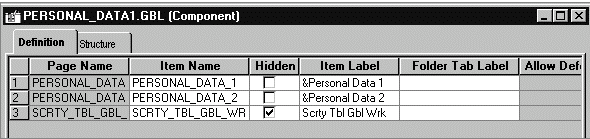
The component item name is specified in the component definition, in the Item Name column on the row corresponding to the specific page, as shown here. In this example, the PERSONAL_DATA page name appears twice: once with an item name of PERSONAL_DATA_1, and once with the item name of PERSONAL_DATA_2.
When you use the DoModalXComponent function in component PreBuild or PostBuild PeopleCode event, do not use browser refresh to reload a page because the browser will throw an error.
Parameters
| Parameter | Description |
|---|---|
|
showInModal |
Specify a Boolean value to indicate whether to display the secondary component in a modal, secondary window:
|
|
cancelButtonName |
Currently, this parameter is not used and should be specified as an empty string: “”. |
|
MENU_NAME |
Name of the menu through which the secondary component is accessed. |
|
BAR_NAME |
Name of the menu bar through which the secondary component is accessed. |
|
MENU_ITEM_NAME |
Name of the menu item through which the secondary component is accessed. |
|
COMPONENT_ITEM_NAME |
The component item name of the page to be displayed on top of the secondary component when it displays. The component item name is specified in the component definition. |
|
action |
String representing the action mode in which to start up the component. You can use either a character value (passed in as a string) or a constant. See below. |
|
|
If only one action mode is allowed for the component, that action mode is used. If more than one action mode is allowed, the user can select which mode to come up in. |
|
SHARED_RECORD_NAME |
The record name of the shared work record (preceded by the reserved word Record). This record must include:
|
|
keylist |
An optional list of field specifications used to select a unique row at level zero in the page you are transferring to, by matching keys in the page you are transferring from. It can also be an already instantiated record object. If a record object is specified, any field of that record object that is also a field of the search record for the destination component is added to keylist. The keys in keylist must uniquely identify a row in the "to" page search record. If a unique row is not identified, the search dialog box appears. If the keylist parameter is not supplied then the destination components' search key must be found as part of the source component's level 0 record buffer. |
The values for action can be as follows:
| Numeric Value | Constant Value | Description |
|---|---|---|
|
A |
%Action_Add |
Add |
|
U |
%Action_UpdateDisplay |
Update/Display |
|
L |
%Action_UpdateDisplayAll |
Update/Display All |
|
C |
%Action_Correction |
Correction |
|
E |
%Action_DataEntry |
Data Entry |
|
P |
%Action_Prompt |
Prompt |
Returns
Returns a Boolean that indicates how the secondary page was terminated. A secondary page can be terminated by the user clicking a built-in OK or Cancel button, or by a call to the EndModalComponent function in a PeopleCode program. In either case, the return value of DoModalXComponent is one of the following:
-
True if the user clicked OK in the secondary page, or if 1 was passed in the EndModal function call that terminated the secondary page.
-
False if the user clicked Cancel in the secondary page, or if 0 was passed in the EndModal function call that terminated the secondary page.
Example
The following example shows how to structure a DoModalXComponent function call:
DoModalXComponent( False, "", MenuName.MAINTAIN_ITEMS_FOR_INVENTORY, BarName.USE_A, ItemName.ITEM_DEFINITION, Component.ESTABLISH_AN_ITEM, "C", Record.NEW7_WRK);Supporting PeopleCode is required if you must assign values to fields in the shared work record or access those values, either from the originating component, or from the secondary component.
Shared Work Records
The originating component and the secondary component share fields in a Derived/Work record called a shared work record. Shared fields from this record must be placed at level zero of both the originating component and the secondary component.
You can use the shared fields to:
-
Pass values that are assigned to the search keys in the secondary component search record. If these fields are missing or not valid, the search dialog box appears, enabling the user to enter search keys.
-
Optionally pass other values from the originating component to the secondary component.
-
Pass values back from the secondary component to the originating component for processing.
To do this, you have to write PeopleCode that:
-
Assigns values to fields in the shared work record in the originating page at some point before the modal transfer takes place.
-
Accesses and changes the values, if necessary, in the secondary component.
-
Accesses the values from the shared work record from the originating component after the secondary component is dismissed.
Restrictions on Use With a Component Interface
This function is ignored (has no effect) when used by a PeopleCode program that’s been called by a component interface.
Restrictions on Use With SearchInit Event
You can't use this function in a SearchInit PeopleCode program.