MessageBox function
Syntax
MessageBox(style, title, message_set, message_num, default_msg_txt[, paramlist])where paramlist is an arbitrary-length list of parameters of undetermined (Any) data type to be substituted in the resulting text string, in the form:
param1 [, param2]. . .Description
Use the MessageBox function to display a message box window. This function combines dialog-display ability with the text-selection functionality of MsgGet, MsgGetText, or MsgGetExplainText. The style parameter selects the buttons to be included. title determines the title of message.
Note:
The title parameter is ignored for messages displayed in the PeopleSoft Pure Internet Architecture. The title of a message box displayed by the browser is always “Message”.
Also, style is ignored if the message has any severity other than Message.
The remaining parameters are used to retrieve and process a message selected from the Message Catalog.
MessageBox can be used for simple informational display, where the user reads the message, then clicks an OK button to dismiss the message box. Use MessageBox as a way of branching based on user choice, in which case the message box contains two or more buttons (such as OK and Cancel or Yes, No, and Cancel). The value returned by the function tells you which button the user clicked, and your code can branch based on that value.
In the MessageBox dialogs, both the Message Text and the Description, that is, more detailed information stored in the Message Catalog, are included.
If MessageBox displays buttons other than OK, it causes processing to stop while it waits for user response. This makes it a "user think-time" function, restricting its use to certain PeopleCode events.
See MsgGet function, MsgGetText function, MsgGetExplainText function PeopleCode Developer’s Guide: Think-Time Functions.
Parameters
| Parameter | Description |
|---|---|
|
style |
Either a numerical value or a constant specifying the contents and behavior of the dialog box. This parameter is calculated by cumulatively adding either a value or a constant from each of the following list of categories: |
Note:
In PeopleSoft Pure Internet Architecture style is ignored if the message has any severity other than Message. If the message has a severity of Warning and the MessageBox PeopleCode is in a SaveEdit event, the message is displayed in a new window with the OK and Cancel buttons.
| Category | Value | Constant | Meaning |
|---|---|---|---|
|
Buttons |
0 |
%MsgStyle_OK |
The message box contains one push button: OK. |
|
1 |
%MsgStyle_OKCancel |
The message box contains two push buttons: OK and Cancel. |
|
|
2 |
%MsgStyle_AbortRetryIgnore |
The message box contains three push buttons: Abort, Retry, and Ignore. |
|
|
3 |
%MsgStyle_YesNoCancel |
The message box contains three push buttons: Yes, No, and Cancel. |
|
|
4 |
%MsgStyle_YesNo |
The message box contains two push buttons: Yes and No. |
|
|
5 |
%MsgStyle_RetryCancel |
The message box contains two push buttons: Retry and Cancel. |
| Parameter | Description |
|---|---|
|
title |
Title of message box. If a null string is specified, then PeopleTools provides an appropriate value. |
Note:
The title parameter is ignored for messages displayed in the PeopleSoft Pure Internet Architecture. The title of a message box displayed by the browser is always "Message".
In fluid user interface, the title is not used for a message box and it is not displayed.
| Parameter | Description |
|---|---|
|
message_set |
The message set number of the message to be displayed. When message set and number are provided, it overrides the specified text. A value less than one indicates that the message comes from the provided text and not the Message Catalog. |
|
message_num |
The message number of the message to be displayed. |
|
default_msg_txt |
Default text to be displayed in the message box. |
|
paramlist |
A comma-separated list of parameters; the number of parameters in the list is arbitrary. The parameters are referenced in the message text using the % character followed by an integer corresponding to the position of the parameter in the paramlist. |
Returns
Returns either a Number value or a constant. The return value is zero if there is not enough memory to create the message box. In other cases the following menu values are returned:
| Value | Constant | Meaning |
|---|---|---|
|
-1 |
%MsgResult_Warning |
Warning was generated. |
|
1 |
%MsgResult_OK |
OK button was selected. |
|
2 |
%MsgResult_Cancel |
Cancel button was selected. |
|
3 |
%MsgResult_Abort |
Abort button was selected. |
|
4 |
%MsgResult_Retry |
Retry button was selected. |
|
5 |
%MsgResult_Ignore |
Ignore button was selected. |
|
6 |
%MsgResult_Yes |
Yes button was selected. |
|
7 |
%MsgResult_No |
No button was selected. |
Example
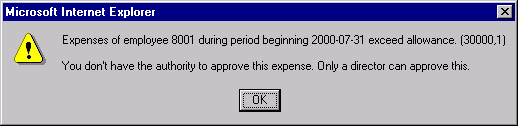
Suppose the following string literal is stored in the Message Catalog as the message text:
Expenses of employee %1 during period beginning %2 exceed allowance.The following is stored in the Explanation:
You do not have the authority to approve this expense. Only a director
can approve this.
Here %1 is a placeholder for the employee ID and %2 a placeholder for the expense period date. The following MessageBox call provides bind variables corresponding to these placeholders at the end of its parameter list:
MessageBox(0, "", 30000, 1, "Message not found.", BUS_EXPENSE_PER.EMPLID, BUS_⇒
EXPENSE_PER.EXPENSE_PERIOD_DT);
If the message severity is Error or Warning, the call would display a message box similar to this:
Suppose the following is stored in the Message Catalog as the message text:
File not found.The following is stored in the Explanation:
The file you specified wasn't found. Either select retry, and specify a new file,⇒
 or cancel.
Suppose this message had a Severity of message, and you used the %MsgStyle_RetryCancel, in the following code:
MessageBox(%MsgStyle_RetryCancel, "", 30000, 2, "Message not found.");This is how the message displays:

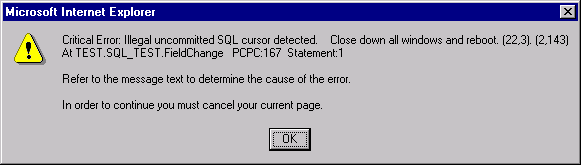
If the message severity is of type Cancel, a critical message is displayed similar to the following:
Message Retrieval
MessageBox retrieves a message from the Message Catalog and substitutes the values of the parameters into the message and explanation.
You can access and update the Message Catalog by accessing You can enter message text in multiple languages. The message_set and message_num parameters specify the message to retrieve from the catalog. If the message is not found in the Message Catalog, the default message provided in default_msg_txt is used. Message sets 1 through 19,999 are reserved for use by PeopleSoft applications. Message sets 20,000 through 32,767 can be used by PeopleSoft users.
The optional paramlist is a comma-separated list of parameters; the number of parameters in the list is arbitrary. The parameters are referenced in the message text using the % character followed by an integer corresponding to the position of the parameter in the paramlist. For example, if the first and second parameters in paramlist were &FIELDNAME and &USERNAME, they would be inserted into the message string as %1 and %2. To include a literal percent sign in the string, use %%; %\ is used to indicate an end-of-string and terminates the string at that point. This is generally used to specify fixed-length strings with trailing blanks.
Message Severity
MessageBox specifies processing for error handling functions based on the message severity, which you can set in the Message Catalog. This enables you to change the severity of an error without changing the underlying PeopleCode, by setting the severity level for the message in the Message Catalog. The message severity settings and processing options are:
| Severity | Processing |
|---|---|
|
Message |
The message is displayed and processing continues. |
|
Warning |
The message is displayed and treated as a warning. |
|
Error |
The message is displayed and treated as an error. |
|
Cancel |
The message is displayed and forces a Cancel. |
In addition, in the PeopleSoft Pure Internet Architecture the Message Severity dictates how the message displays:
-
If the message has a severity of Warning, Error, or Cancel, the message is displayed in a pop-up dialog box with a single OK button regardless of the value of the style parameter.
-
If the message has a severity of Message and style is %MsgStyle_OK (0), the message displays in a pop-up dialog box with the single OK button.
-
If the message has a severity of Message and style is not %MsgStyle_OK (0), the message displays in a separate window.
In fluid user interface, the message displays in a pop-up dialog box.
Restrictions on Use in PeopleCode Events
If MessageBox displays any buttons other than OK, it returns a value based on the end user response and interrupts processing until the end user has clicked one of the buttons. This makes it a "user think-time" function, subject to the same restrictions as other think-time functions which means that it cannot be used in any of the following PeopleCode events:
-
SavePreChange.
-
Workflow.
-
RowSelect.
-
SavePostChange.
-
Any PeopleCode event that fires as a result of a ScrollSelect (or one of its relatives) function calls, or a Select (or one of its relatives) Rowset class method.
If the style parameter specifies a single button (that is, the OK button), the function can be called in any PeopleCode event.
Important:
On the initial loading of a component (initial page Activate event), it is recommended that you allow the component to render correctly before you call any modality that requires user interaction (think-time functions).
If you call any modality that requires user interaction during the initial page Activate event, except if its a message box with only an OK button, the user interaction suspends the processing of the page load leading to undesired rendering. For example, the message box (with more than one button) loses its styling, and the rendering of the page and component is corrupted. If you use DoModalPopup or DoModalComponentPopup, you should note that it will render as a full page.
Restrictions on Use With PeopleSoft Pure Internet Architecture
In the PeopleSoft Pure Internet Architecture, you can’t change the icon of a message box. You can change the number and type of buttons, and the default button, but the message always displays with the warning icon (a triangle with an exclamation mark in it.)
In addition, you can't change the message box title. The message box title is always 'Message'.
If the message has a severity of Warning and the MessageBox PeopleCode is in a SaveEdit event, the message is displayed in a new window with the OK and Cancel buttons.
Restrictions on Use With Application Engine
If you call MessageBox from a PeopleCode action in an Application Engine program, the syntax is the same. However, all GUI-related parameters like style and title are ignored. You should use 0 and "".
Note:
If you have an existing MessageBox in code called from a page, it should work as is.
The actual message data is routed to PS_MESSAGE_LOG at runtime, and you can view it from the Process Monitor by drilling down to the process details.
Related Topics