TransferTop function
Syntax
TransferTop(new_window, MenuName.MENU_NAME, BarName.BAR_NAME, ItemName.MENU_ITEM_NAME, Page.COMPONENT_ITEM_NAME, action [, keylist])In which keylist is a list of field references in the form:
[recordname.]field1 [, [recordname.]field2]. . .Or in which keylist is a list of field references in the form:
&RecordObject1 [, &RecordObject2]. . .Description
Use the TransferTop function to exit the current context and transfer the user to another page by always replacing the current window. Use the TransferTop function as an alternative to the Transfer function to ensure that when the source component is being displayed within a fluid wrapper (that is, the source component is being displayed within a fluid activity guide, a master/detail component, an interactive grouplet, or a modeless window) that the entire current window is replaced with the new content.
Unlike Transfer, TransferTop ignores the new_window parameter. TransferTop always exits the current context and completely replaces the current window.
You can use TransferTop from a secondary page only if you’re transferring to a separate instance of a component. You cannot use TransferTop from a secondary page if you’re not transferring to a separate instance of a component.
If you provide a valid search key for the new page in the optional keylist, the new page opens directly, using the values provided from keylist as search key values. A valid key means that enough information is provided to uniquely identify a row: not all of the key values need to be provided. If no key is provided, or if the key is invalid, or if not enough information is provided to identify a unique row, the search page could be displayed (depending on the component), enabling the user to search for a row.
If MENU_NAME+BAR_NAME+MENU_ITEM_NAME+COMPONENT_ITEM_NAME is an invalid combination, an error message displays explaining that there were invalid transfer parameters.
In the COMPONENT_ITEM_NAME parameter, make sure to pass the component item name for the page, not the page name.
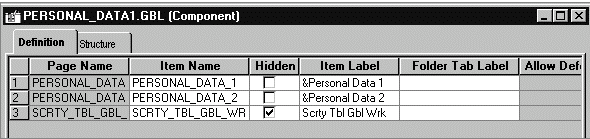
The component item name is specified in the component definition, in the Item Name column on the row corresponding to the specific page, as shown here. In this example, the PERSONAL_DATA page name appears twice: once with an item name of PERSONAL_DATA_1, and once with the item name of PERSONAL_DATA_2.
Parameters
| Parameter | Description |
|---|---|
|
new_window |
Note: This parameter is ignored and has no effect. |
|
MENU_NAME |
The name of the menu where the page is located prefixed with the reserved word MenuName. |
|
BAR_NAME |
The name of the menu bar where the page is located prefixed with the reserved word BarName. |
|
MENU_ITEM_NAME |
The name of the menu item where the page is located prefixed with the reserved word ItemName. |
|
COMPONENT_ITEM_NAME |
The component item name of the page to be displayed on top of the component when it displays. The component item name is specified in the component definition. This parameter must be prefixed with the keyword Page. |
|
action |
Uses a single-character code as in %Action. Valid actions are "A" (add), "U" (update), "L" (update/display all), "C" (correction), and "E" (data entry). |
|
[keylist] |
An optional list of field specifications used to select a unique row at level zero in the page you are transferring to, by matching keys in the page you are transferring from. It can also be an already instantiated record object. If a record object is specified, any field of that record object that is also a field of the search record for the destination component is added to keylist. The keys in the fieldlist must uniquely identify a row in the "to" page search record. If a unique row is not identified, or if Force Search Processing is selected for the component, the search dialog box appears. If the keylist parameter is not supplied then the destination component's search key must be found as part of the source components level 0 record buffer. |
Returns
None.
Example
The example starts does not start a new instance of the component processor, but transfers to a new page in Update mode.
TransferTop( False, MenuName.QE_FLUID_CR, BarName.USE, ItemName.QE_CBACK_F1, Page.QE_CBACK_F1, "U");
Restrictions on Using TransferTop
-
TransferTop cannot be used with an Internet script or an Application Engine program.
-
TransferTop is ignored (has no effect) when used by a PeopleCode program that’s been called by a component interface.
-
You can't use TransferTop in a SearchInit PeopleCode program.