Validating Change Assistant Settings
After you have set up and configured PeopleSoft Change Assistant and the Environment Management components, you should validate your PeopleSoft Change Assistant and environment settings.
PeopleSoft Change Assistant validates settings by:
-
Locating valid SQL query tools required to run SQL scripts.
-
Testing the Environment Management hub and ensuring that PeopleSoft Change Assistant can communicate with it.
-
Testing My Oracle Support and ensuring that PeopleSoft Change Assistant can communicate with it.
PeopleSoft Change Assistant sends a ping to My Oracle Support and then tests the connection. In order for the validation to succeed, the machine where you have PeopleSoft Change Assistant installed must have the ping feature enabled.
You can also print a summary of your environment, which can facilitate the diagnosis of problems by Oracle Software Support.
To validate your environment, select Tools, Options, Validate. Click Start Validation.
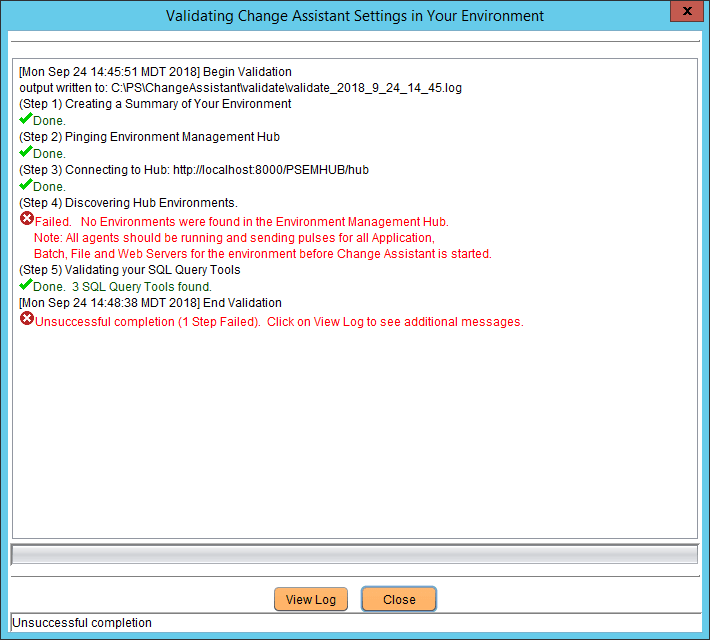
If any of the steps were unable to complete successfully, open the log file to determine the cause. This example shows a summary with both successful messages (“Done”) and unsuccessful (“Failed” or “Unsuccessful completion”):
Figure C-1 Validating Change Assistant Settings in Your Environment
Note:
If you use proxy servers, the system will ping those and prompt for proxy server user ID and password. In this case, the validation step numbers would be different from the example.
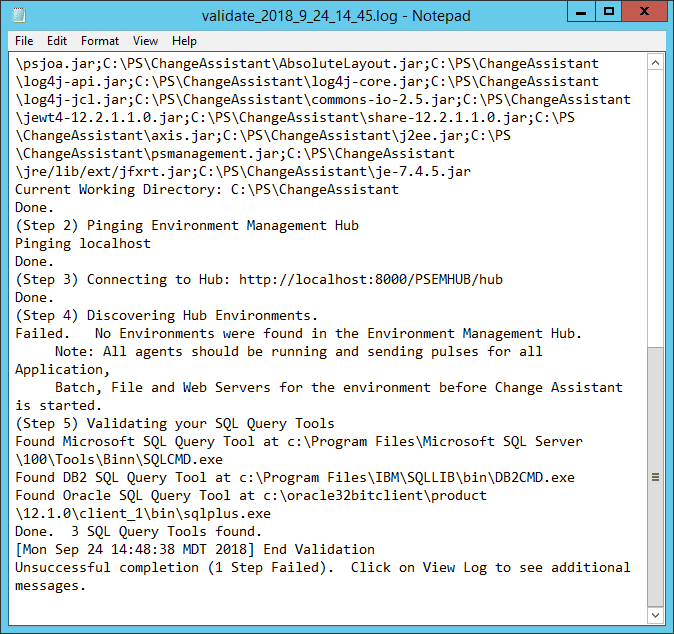
To review the log file, click the View Log button at the bottom of the screen. This example shows the first several lines of a log file:
Figure C-2 Change Assistant Validation log