Reviewing Change Control
Earlier in the upgrade process, in the beginning of the chapter “Applying PeopleTools Changes,” the Change Control feature was disabled. In this step, you re-enable Change Control, if your site uses this functionality.
To turn on Change Control:
-
Sign in to the Target database using PeopleSoft Application Designer.
-
Select Tools, Change Control, Administrator.
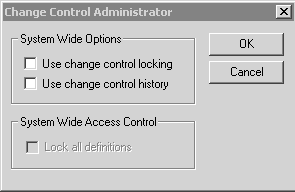
The following example shows the options available on the Change Control Administrator dialog box:
Figure 4-1 Change Control Administrator dialog box
-
Set “Use change control locking” and “Use change control history” according to your site specifications.
See “Applying PeopleTools Changes,” Turning Off Change Control.
Properties
| Database Orientation | Pass Type | Products | Platforms | Languages |
|---|---|---|---|---|
|
Target |
All |
All |
All |
All |