Maintaining Chart Data
Access the Maintain Chart Data page (PeopleTools, Performance Monitor, History, Concurrent Signon Chart, Maintain Chart Data).
The Maintain Chart Data enables you to set the criteria by which you purge and extract the concurrent sign-in user data. Once your criteria has been set, click Run to launch the PSPMCSOSUM Application Engine program, which extracts summary information for PMU 108 (user session ended) and PMU 109 (user session began) from Performance Monitor PMU tables.
Note:
When the PSPMCSOSUM Application Engine program runs, it does not manipulate or alter existing data for PMU 108 and PMU 109. It extracts the previously stored PMU 108 and PMU 109 data required by concurrent sign-in monitoring and inserts the data into tables used by concurrent sign-in monitoring. When you purge concurrent sign-in information, you do not delete stored PMU data—only the summary data stored for concurrent sign-in monitoring is purged.
This example illustrates the fields and controls on the Maintain Chart Data page. You can find definitions for the fields and controls later on this page.
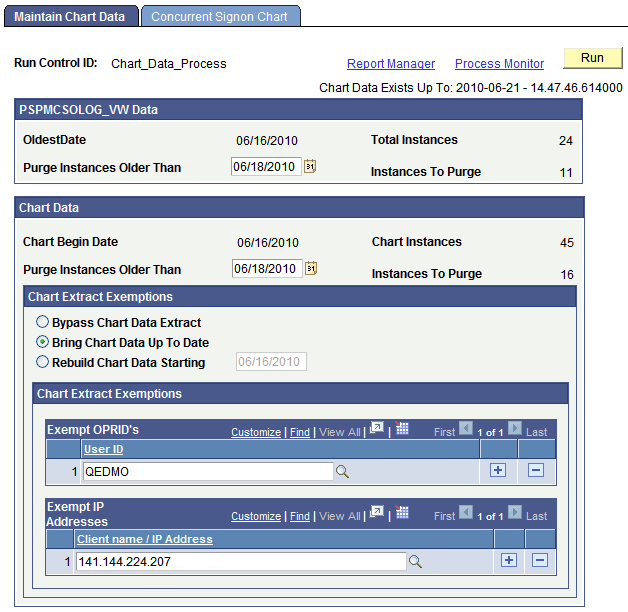
| Field or Control | Description |
|---|---|
|
Run Control ID |
Because this page should only have limited access, the run control is not saved by user ID. A universal run control, Chart_Data_Process, exists for the PSPMCSOSUM Application Engine program. |
|
Chart Data Exists Up To |
Displays how current the sign-in data is. This the last time the PSPMCSOSUM Application Engine program ran. |
|
Oldest Date |
Displays the oldest date of stored sign-in summary data. |
|
Total Instances |
Displays the number of rows of extracted PMU summary information stored in the concurrent sign-in tables. |
|
Purge Instances Older Than |
To reduce the number of rows of stored PMU summary information, specify the date of the older rows that are no longer needed. |
|
Chart Begin Date |
Displays the date of the oldest rows being stored for the concurrent sign-in chart. |
|
Chart Instances |
Shows the number of rows of sign-in data being stored for displaying the concurrent sign-in chart. |
|
Purge Instances Older Than |
To reduce the number of rows of chart data, specify the date of the older rows that are no longer needed. |
|
Instances To Purge |
After specifying the chart data purge date, Instances to Purge displays the number of rows that will be deleted, showing the space you will reclaim. |
|
Bypass Chart Data Extract |
Select if you only need to run the purge functions of the PSPMCSOSUM Application Engine program. In this case, only the specified information will be purged, and no new information will be added to the chart data. |
|
Bring Chart Up To Date |
(Default) Extracts all concurrent sign-in information to update the chart data. |
|
Rebuild Chart Data Starting |
Select to build the chart using data starting after the date you specify. |
|
Exempt OPRID's |
To make specific user IDs exempt from appearing in chart data, add those IDs to this grid. For example, exempt IDs might include those used by administrators or consultants, not actually part of the user base or the service contract. |
|
Exempt IP Addresses |
To make logins from specific workstations exempt from appearing in chart data, add either the IP address or the workstation name to this grid. |