Configuring to Restrict Reports Within the Component Context
The analytic reports that are created using Simplified Analytics can be restricted to be accessed only within the component context, that is within the My Analytics section in the right panel of the component.
To configure for restricting reports within the component context, deselect the When used as analytics template, allow created reports to be accessed outside the component context option in the Pivot Grid Wizard - step 4 for the base template model. This option is selected for all Pivot Grid models by default.
This example illustrates the Pivot Grid Wizard - step 4. In the Fluid Mode Options section, the When used as analytics template, allow created reports to be accessed outside the component context option is selected.
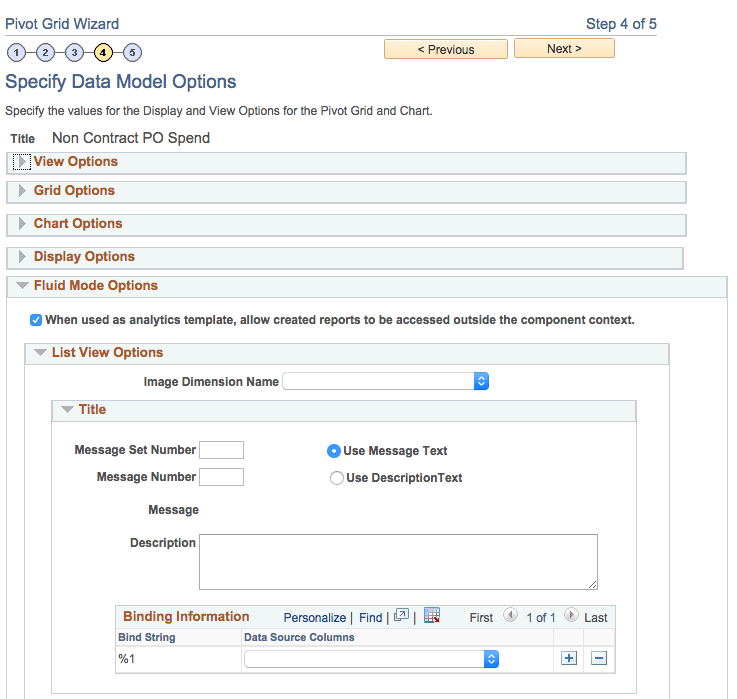
In general, this option should be deselected if Authorization as Service is implemented for the Simplified Analytics of the component, where there is custom logic in code to control who can see or create which type of reports. Because custom authorization code cannot be run outside the component context, this option must be deselected.
When this option is deselected, the reports that are created using the Create Analytics Wizard based on the specific template:
-
Can be accessed only from the My Analytics section at the right of the component from which it is created.
-
Cannot be published to the fluid homepage using the Publish or Add to Homepage options.
-
Cannot be accessed using the Pivot Grid Viewer (Reporting Tools, Pivot Grid, Pivot Grid Viewer), drilling URLs, pagelets, related actions, and so on.
This security option can also be used if the prompt values passed from the page (as bind parameters) control the security of the data that the users are viewing. These prompts (such as the Supplier in the previous examples) are:
-
Read-only when they are accessed from within the component context (for example, My Analytics).
-
Editable when they are accessed from outside the component context (such as when they are invoked from the landing page).
Therefore, you can use this security option to restrict the report only to the component context as needed.
However, Oracle PeopleSoft strongly recommends that you implement row-level security on the query to restrict the data for specific users. Further, the view behind the lookup prompts for the analytic reports should also include the correct security joins to display only the list of values allowed for any user.