Copying Pivot Grid Model
Pivot Grid administrators use the Copy Pivot Grid Model page (PTPG_ADMN_SAVEAS) to copy an existing model and give it a new model name and title. Optionally, they can select to copy user personalization using the Include Personalizations option.
Note:
You cannot copy the Pivot Grid model that was created using a component as the data source because only one Pivot Grid model can be associated with a component.
Navigation:
This example illustrates the fields and controls on the Copy Pivot Grid Model page.
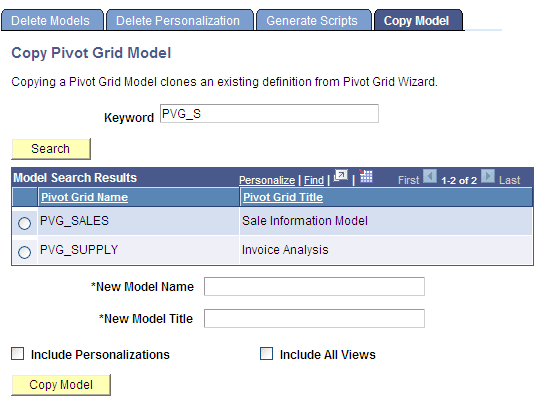
To copy a specific model and its associated views in the database:
-
Select Reporting Tools, Pivot Grid, Pivot Grid Administration, Copy Model.
-
Search for and select a model.
-
Enter a new model name and its description.
-
Optionally, select the Include Personalizations option to copy all user personalizations.
-
Optionally, select the Include All Views option to copy all customized views.
-
Click the Copy Model button to copy the model.
A successful message appears if the copy is completed.
An error message appears if:
-
You copy the Pivot Grid model that was created using a component as the data source.
-
The name of the new model already exists.
-
The name of the new model is empty.
-
The description of the new model is empty.
-