Deleting Non-Default Views
Pivot Grid administrators use the Delete Non Default Views page (PTPG_ADMN_DELNDV) to view and delete non-default views that are associated with the models.
Navigation:
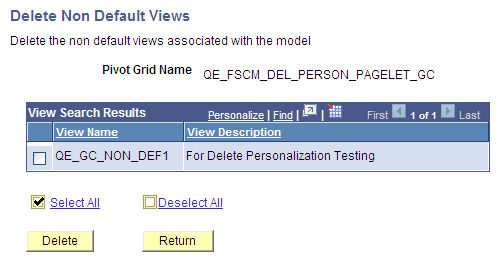
This example illustrates the fields and controls on the Delete Non Default Views page.
To delete non-default views that are associated with a Pivot Grid model in the database:
-
Select Reporting Tools, Pivot Grid, Pivot Grid Administration, Delete Models.
-
Click the Search button to display all Pivot Grid models that you have authorization to delete.
If non-default views are associated with the model, the Delete Non Default Views link appears.
-
Click the Delete Non Default Views link next to the Pivot Grid model.
The non-default views are listed by name and description.
-
Select appropriate non-default views and click the Delete button.
Note:
Non-default views are created using the Pagelet Wizard - Specify Data Source Parameters page.