Pivot Grid Viewer Search Page
Navigation:
This example illustrates the fields and controls on the Pivot Grid Viewer search page. If the Show All Views option is selected, the system displays the default and non-default views associated with the Pivot Grid models.
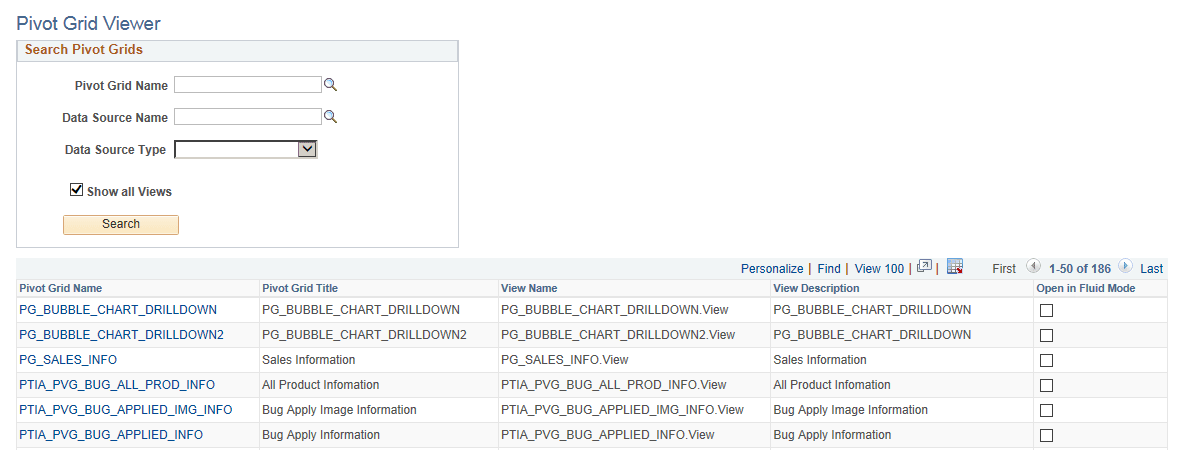
| Field or Control | Description |
|---|---|
|
Pivot Grid Name |
Search using the pivot grid name. |
|
Data Source Name |
Search using the data source value. |
|
Data Source Type |
Search using PS Query, Component, or Composite Query. |
|
Show all Views |
Select to see all views created from a pivot grid model. |
|
Open in Fluid Mode |
Click the box to view the pivot grid model in the classic view. The check box is selected by default for all the pivot grid models in the search results. |
Note:
A search run without any search condition on the Pivot Grid Viewer search page yields a maximum of 1000 search results. If you are looking for a search result which is not already displayed within the 1000 rows, then use a search condition to refine your search.