Specifying Publishing Options
Use the Specify Publishing Options page (PTPPB_WIZ_PUBOPT) to define the location, type, and security attributes for the pagelet and publish the pagelet.
Navigation:
Access the Specify Publishing Options page by clicking the Next button on the Select Display Options page.
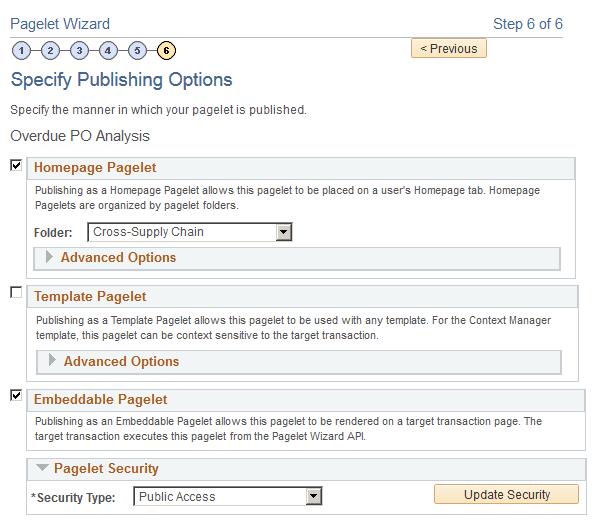
This example illustrates the fields and controls on the Specify Publishing Options page. Definitions for the fields and controls appear following the example.
Note:
You can include the Pivot Grid pagelet in Operational Dashboards, WorkCenters (pagelet width 256 pixels when configured in a workcenter), and homepages. Only the Homepage Pagelet and Embeddable Pagelet options are applicable for Pivot Grid pagelets.
| Field or Control | Description |
|---|---|
|
Homepage Pagelet |
Select this option to publish the pagelet as a homepage pagelet that can be added to a homepage or WorkCenter operational dashboard page. |
|
Template Pagelet |
This option is not applicable for pivot grids. |
|
Embeddable Pagelet |
Select this option to make your pagelet available as an embeddable pagelet that can be generated by the Pagelet Wizard API for rendering within an HTML area of a PeopleSoft Pure Internet Architecture target page or using an iScript. |
|
Pagelet Security |
Administrators can set pagelet security as public, or they can set a permission list based on user roles. |
|
Save |
Click to save the pagelet. |
|
Finish |
Click to transfer to the Pagelet Creation Confirmed page, where you also can save the pagelet. Access the homepage to personalize it to include the newly created pagelet. |
Note:
While working with the Pagelet Wizard, you can modify your previous selections at any step by clicking a step number icon. Changes in your selection could change the structure of a pagelet.
See Portal Technology: Specifying Pagelet Publication Options.