Adapting Homepage and Pagelet Definitions
This section discusses how to:
-
Build portal homepage tabs by using fixed-name HTML and image definitions.
-
Add images to homepage tabs.
Building Portal Homepage Tabs by Using Fixed-Name HTML and Image Definitions
PeopleSoft applications use fixed-name HTML and image definitions to build portal homepage tabs. You can override default HTML definitions and images that are used for homepage elements, such as tabs and pagelets, by adding attributes on the Content Ref Administration page.
Access the Content Ref Administration page (Select Click the Portal Objects link.)
To work with homepages, click the Homepages link, then the Tabs link. Click a homepage tab label.
To work with pagelets, click the Pagelets link, then a pagelet group name link. Click a pagelet label.
This example illustrates building portal homepage tabs using fixed-name HTML and image definitions.
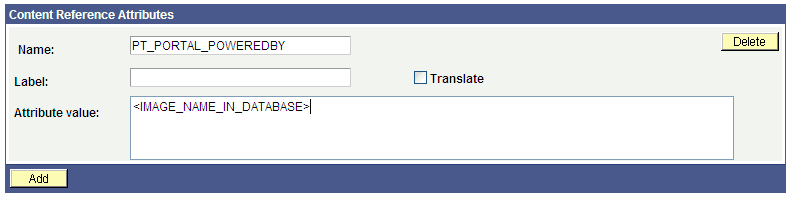
To override a default fixed-name HTML or image definition:
-
In the Content Reference group box at the bottom of the page, click the Edit link for a content reference.
-
Scroll to the Content Reference Attributes group box for a content reference.
-
In the Name field, enter the name of the default definition that you want to change.
-
Deselect the Translate check box.
Note:
You must deselect the Translate check box for the override to be successful.
-
In the Attribute Value field, specify the new definition value.
Note:
The value that you specify can consist of letters, digits, and underscores ( _ ). It cannot contain any spaces and cannot begin with a digit.
-
Click Save.
You can omit the Label field value.
As shown in the example, to replace the Powered by PeopleSoft image on the homepage tab, add a untranslated attribute named PT_PORTAL_POWEREDBY with a new image definition name in the database.
This table shows a list of default definitions that you can change for a tab:
| HTML or Image Definition | Value |
|---|---|
|
PT_PORTAL_POWEREDBY |
Image name in database. |
|
PT_PORTAL_IC_REFRESH |
Image name in database. |
|
PT_PORTAL_IC_EDIT |
Image name in database. |
|
PT_PORTAL_IC_CLOSE |
Image name in database. |
|
PT_PORTAL_IC_COLLAPSE |
Image name in database. |
|
PT_PORTAL_IC_EXPAND |
Image name in database. |
|
PT_PGLT_HELP |
Image name in database. |
|
PORTAL_HP_COMPONENT |
HTML definition name in database. |
|
PORTAL_HP_ACTIONBAR |
HTML definition name in database. |
|
PORTAL_HP_ACTIONBAR_REFRESH |
HTML definition name in database. |
|
PORTAL_HP_ACTIONBAR_REMOVE |
HTML definition name in database. |
|
PORTAL_HP_ACTIONBAR_EDIT |
HTML definition name in database. |
|
PORTAL_HP_ACTIONBAR_HELP |
HTML definition name in database. |
|
PORTAL_HP_2COL_LAYOUT |
HTML definition name in database. |
|
PORTAL_HP_3COL_LAYOUT |
HTML definition name in database. |
|
PORTAL_HP_USER_TEMPLATE |
HTML definition name in database. |
Adding Images to Homepage Tabs
You can specify up to 15 extra images for a homepage by using %BIND variables on PORTAL_HP_COMPONENT and PORTAL_HP_ACTIONBAR_xxx HTML definitions. Homepage generation logic replaces %BIND12 to %BIND26 on the homepage tab by the images that are specified as attributes.
Note:
Bind variables for images and all HTML components (tab and pagelet) should be not be translated. To make an item not translatable, deselect the Translate check box.
The following %BIND variables can be replaced by the Homepage Generation service (specify bind variables in PeopleSoft Application Designer):
| Bind Variable | Definition Replaced |
|---|---|
|
%BIND(:1) |
The PT_PORTAL_POWEREDBY image (Powered By PeopleSoft image). |
|
%BIND(:2) |
The result of a function call to %Request.Full URI. |
|
%BIND(:3) |
The result of a function call to %Request.GetHelpURL('PERSHOEPAGE'). |
|
%BIND(:4) |
The result of a function call to refreshonExpire. |
|
%BIND(:5) |
The PT_PGLT_HELP image. |
|
%BIND(:6) |
The result of a function call to %Request.GetHelpURL(&Pglt.HelpID). |
|
%BIND(:7) |
The PT_PORTAL_IC_EDIT image (edit image for a pagelet). |
|
%BIND(:8) |
The result of a function call to SetRefreshPage. |
|
%BIND(:9) |
The PT_PORTAL_IC_CLOSE image. |
|
%BIND(:10) |
The PT_PORTAL_IC_COLLAPSE image. |
|
%BIND(:11) |
The PT_PORTAL_IC_EXPAND image. |
|
%BIND(:12) to %BIND(:26) |
The value of the tab attribute IMAGE_BIND_X, where X ranges from 12 to 26. |
|
%BIND(:28) |
The PT_PORTAL_IC_REFRESH image. |
This code sample shows how to specify custom %BIND images to display custom images for the PORTAL_HP_COMPONENT HTML definition:
<!-- Begin Pagelet=%BIND(:5) -->
<!-- PageletState=MAX -->
<TABLE id="" CLASS="PTPAGELET" WIDTH="100%"⇒
 CELLPADDING="0" CELLSPACING="0" BORDER="1">
<TR>
     <TD>
          <!--Image 12 will be displayed here.-->
          <IMG SRC="%BIND(:12)" NAME="anything you like">
          <!--Image 13 will be displayed here.-->
          <IMG SRC="%BIND(:13)" NAME="anything you like">
          <!--Image 14 will be displayed here.-->
          <IMG SRC="%BIND(:14)" NAME="anything you like">
          <!--Image 26 will be displayed here.-->
          <IMG SRC="%BIND(:26)" NAME="anything you like">
     </TD>
</TR>
   <TR>
      <TD CLASS="PTPAGELETHEADER">
         %BIND(:1)
         %BIND(:2)</nobr>
      </TD>
   </TR>
   <TR>
      <TD CLASS="PTPAGELETBODY" WIDTH="100%">
         <Pagelet Name="%BIND(:2)">
            <Source Pagelet="%BIND(:4)" href="%BIND(:3)" />
         </Pagelet>
      </TD>
   </TR>
</TABLE>
<BR>
<!-- End Pagelet=%BIND(:5) -->
The HTML definitions PORTAL_HP_2COL_LAYOUT and PORTAL_HP_3COL_LAYOUT HTML can be modified similarly to display extra images.
The Homepage Generation service replaces the image that is specified by the attribute IMAGE_BIND_12 in place of bind variable %BIND(:12), and so on.
WARNING:
Pagelet HTML is parsed by the portal servlet. Be sure that the HTML is properly formatted and that none of the matching tags are missing. Improperly formatted HTML and missing tags may result in unexpected web server behavior.