Basic Portal URL Format
URLs provide the addresses for content so that it can be located and correctly identified. The portal servlet needs three pieces of information to present a page to the user. These are integral parts of a PeopleSoft portal URL:
-
The name of the portal through which content is being accessed.
-
The node that hosts the content.
-
The type and ID of the content.
The portal servlet uses the node name in the URL to determine the location of the servlet for that node (stored as part of the node object). If the content is hosted by the local database, the portal servlet communicates with the content servlet directly (Java method calls), not through HTTP (using the portal content servlet URL).
The ID format is different for each content type. Components are identified by menu, component, and market; scripts are identified by the program name, and so on. The portal registry determines the content reference for this content, and for the template and the pagelets that appear around with it.
The following diagram
shows how the URL lists the required information from left to right:
portal (EMPLOYEE), node (PSFT_HR), content type (c), content ID (MAINTAIN_SECURITY.USERMAINT.GBL)
for this example URL:
http://sun09/psp/ps/EMPLOYEE/PSFT_HR/c/MAINTAIN_SECURITY.USERMAINT.GBL
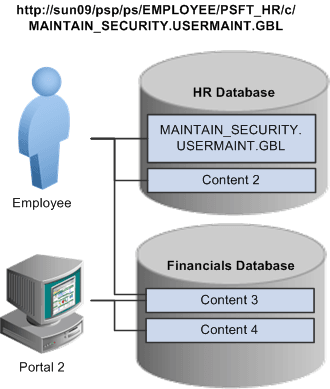
This is consistent with the logical organization of content in portals and databases. At the left side of the figure, portals point to nodes and, ultimately, to content within those nodes.
Here’s what a portal URL looks like:
http://server/servlet_name/sitename/portalname/nodename/content_type/content_id?content_parm
The following table describes the different sections of the URL:
| Section | Description |
|---|---|
|
http://server/ |
Scheme (HTTP / HTTPS ) and web server name. Important: The server name and port in this section must not exceed 30 characters in length. For example, http://mybiglongservername.example.com:8080, not including the http:// prefix, is 36 characters—six characters too long. |
|
servlet_name/ |
The name of the physical servlet that the web server invokes to handle the request. |
|
site_name/ |
The site name specified during PeopleSoft Pure Internet Architecture setup. This enables you to set up multiple sites on one physical web server. The site name is ultimately mapped by the web server to the appropriate configuration.properties file. Important: The site name can include underscores ( _ ), but an underscore cannot be followed by a numeric character or the string newwin (for example, my_site_3 or my_newwin_site). |
|
portal_name/ |
Name of the portal to use for this request. The portal definition contains metadata that describes how to present the content (template, pagelets, and so on). |
|
node_name/ |
Name of the node that contains the content for this request. |
|
content_type/ |
Type of the content for this request. |
|
content_id |
The identification of the content. The ID and type ensure that the correct content is retrieved. |
|
?content_parm |
Query string parameters (name value pairs) for the content. |