Configuration Options
You can configure your environment to support either a physical or a logical application server configuration. In some cases, the PeopleSoft standard installation procedure recommends one or the other depending on the combination of database and operating system at your site.
Generally, your application server should be on the same physical machine as the database server. This produces a logical separation between the application server and database server. If the application server and database server don't reside on the same machine, then the application server and the database server should be connected to the same high-performance backbone network. This ensures optimum performance.
Logical Application Server Configuration
A logical application server environment is one in which one or more servers share the same physical machine. The servers are logically, but not physically, separate.
The following diagram depicts a logical configuration with two server machines—one for the web server and the other for the application and database servers:
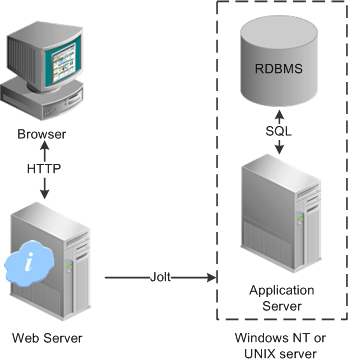
The dashed line surrounding the application server and the database server represents one physical machine. In this case, a logical application server configuration is possible only when both the database server and the application server are supported on a particular operating system. This shows that certain PeopleSoft Pure Internet Architecture elements can share the same machine.
Although this diagram depicts the application server and the database server sharing the same machine, the web server could also reside on the same machine with both the application server and the database server. The only requirement is that each component be supported by the underlying operating system. If all servers are located on the same machine, however, you should consider security issues. If you're deploying PeopleSoft applications to the internet, you will most likely want your web server outside of your network firewall and not on the same machine as the database server.
Note:
For development, testing, or training purposes, you might want to have all PeopleSoft Pure Internet Architecture elements on the same Microsoft Windows or UNIX machine.
Physical Application Server Configuration
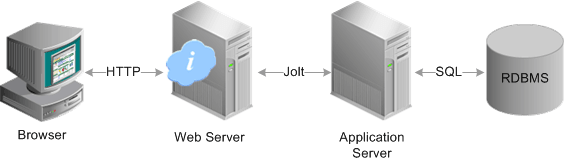
A physical application server configuration is one in which each component resides on a separate machine.
The following diagram depicts a physical configuration in which the application server is physically separate from the database server and the web server: