Creating and Maintaining Style Sheet Objects
Use the Style Sheet objects page to upload and maintain free form style sheet objects used for branding.
Navigation:
-
.
-
Select the Style Sheet tab.
This example illustrates the fields and controls on the Style Sheet objects page. You can find definitions for the fields and controls later on this page.
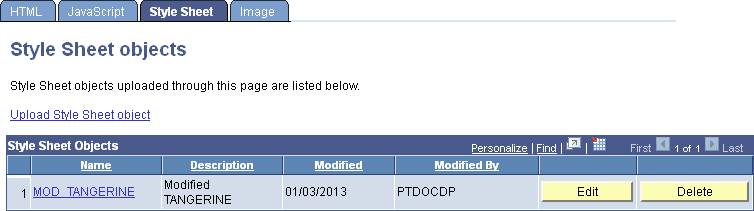
| Field or Control | Description |
|---|---|
|
Upload Style Sheet Object |
Click the link to create a new free form style sheet object. |
|
Name |
Click the object name link for an existing free form style sheet object to view the object details including style definitions. |
|
Description |
Displays the object’s description. |
|
Edit |
Click the Edit button to modify the description or stored style definitions. |
|
Delete |
Click the Delete button to delete the object from the database. |
Note:
The link to view the style sheet is displayed only if the user has read permissions on the object. The Edit and Delete buttons are displayed only if the user has read/write permissions on the object.
Style sheet objects created in Application Designer cannot be viewed or edited in portal branding. However, free form style sheet objects created in portal branding can be viewed and modified in Application Designer.