Creating PeopleSoft Component Service Definitions
On the Define Related Content Service page, select the PeopleSoft Component URL type.
Note:
PeopleSoft components can implicitly act as anonymous services (select Content Reference as the service type). You must define this type of service explicitly in certain circumstances. See Explicit Definition Versus Anonymous Services.
This example illustrates some of the fields and controls on the Define Related Content Service page for a PeopleSoft component. You can find definitions for some of the fields and controls later on this page.
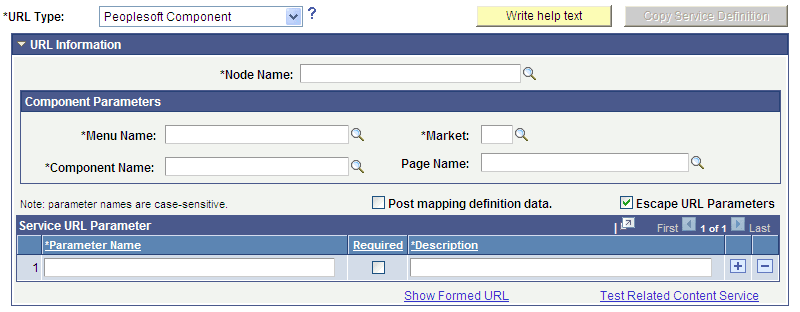
Component Parameters
| Field or Control | Description |
|---|---|
|
Menu Name |
Enter the definition name of the PeopleSoft menu on which the component is located as configured in PeopleSoft Application Designer. |
|
Market |
Enter the market, such as GBL, of the component as defined in PeopleSoft Application Designer. |
|
Component Name |
Enter the component definition as defined in PeopleSoft Application Designer. |
|
Page Name |
Enter the page definition as defined in PeopleSoft Application Designer. Use this field to open a specific page in the component when it appears in the related content target area. |
PeopleSoft Component URL Example
This is an example of a fully formed PeopleSoft component URL:
http://myserver.example.com/psp/ps/EMPLOYEE/PT_LOCAL/c/MAINTAIN_SECURITY.USERMAINT.GBL?OPRID=PTPORTAL